情報
As one entry in the engineer diary series, I’m writing up my personal validation notes.
This time, I tried seeing how far Codex can go—cause investigation, troubleshooting, and even design changes—after an error happens when you pass it an external service’s Skill.
Introduction
I had Codex take the Bright Data Skill and create a CLI that collects Qiita articles with the “Python” tag and lets you do search/ranking display.
What I wanted to see this time wasn’t the overall completion level of the CLI itself.
When Codex hits an error unique to an external service, how far can it investigate the cause—and change the acquisition method to rebuild things?
As a result, the initial approach that used Qiita’s official API stopped at HTTP 402 / policy_20140.
From there, I had it investigate the cause, and ultimately it switched to Bright Data’s Browser API and worked all the way through fetching 45 articles over 2 pages.
That said, it wasn’t fully autonomous. Along the way, I also gave it extra instructions from a human, like “don’t run away to direct access” and “don’t assume it’s KYC—re-check.”
In this article, I’ll include that boundary as well.
TL;DR
- I made Codex implement a Qiita article-collection CLI using Bright Data
- It initially chose Qiita’s official API and successfully fetched 20 items on page 1
- On page 2 it hit
HTTP 402 / policy_20140 - From re-investigation, it turned out the problem was the
/api/*acquisition path—not the whole of Qiita - I abandoned the Qiita API and redesigned for the Bright Data Browser API
- In the end it saved 45 items across 2 pages to SQLite, and search/ranking display + tests all worked
- The direction for investigating the cause was set by humans, but the specific investigation and implementation changes were advanced by Codex
Why I used Bright Data
I chose Bright Data this time because you can operate it via a CLI/Skill from AI coding agents like Codex, and it offers multiple ways to acquire data—Web Unlocker, Browser API, Scraper Studio, and more.
I thought it was a great exercise to see how Codex switches to another method when one acquisition method fails.
What I asked Codex to do
The initial requirements I gave it were:
- Use Bright Data to fetch data from the web
- Target Qiita articles with the “Python” tag
- Save title, URL, author, publication date, and popular metrics that can be acquired
- Sort by newest and by popularity
- Filter by keywords
- Save to JSON or SQLite
- From a CLI, fetch/search/rank and display
For the implementation approach, I basically left it to Codex.
Please handle the implementation method.
Check the Bright Data CLI, the Skills you can use, and the documentation, and choose the appropriate approach.
If an error occurs, investigate the cause and fix it yourself as much as possible.
I didn’t specify concrete CLI commands or implementation code.
The Qiita API worked at first
First, Codex started by looking into the Bright Data CLI’s Skill and the local environment.
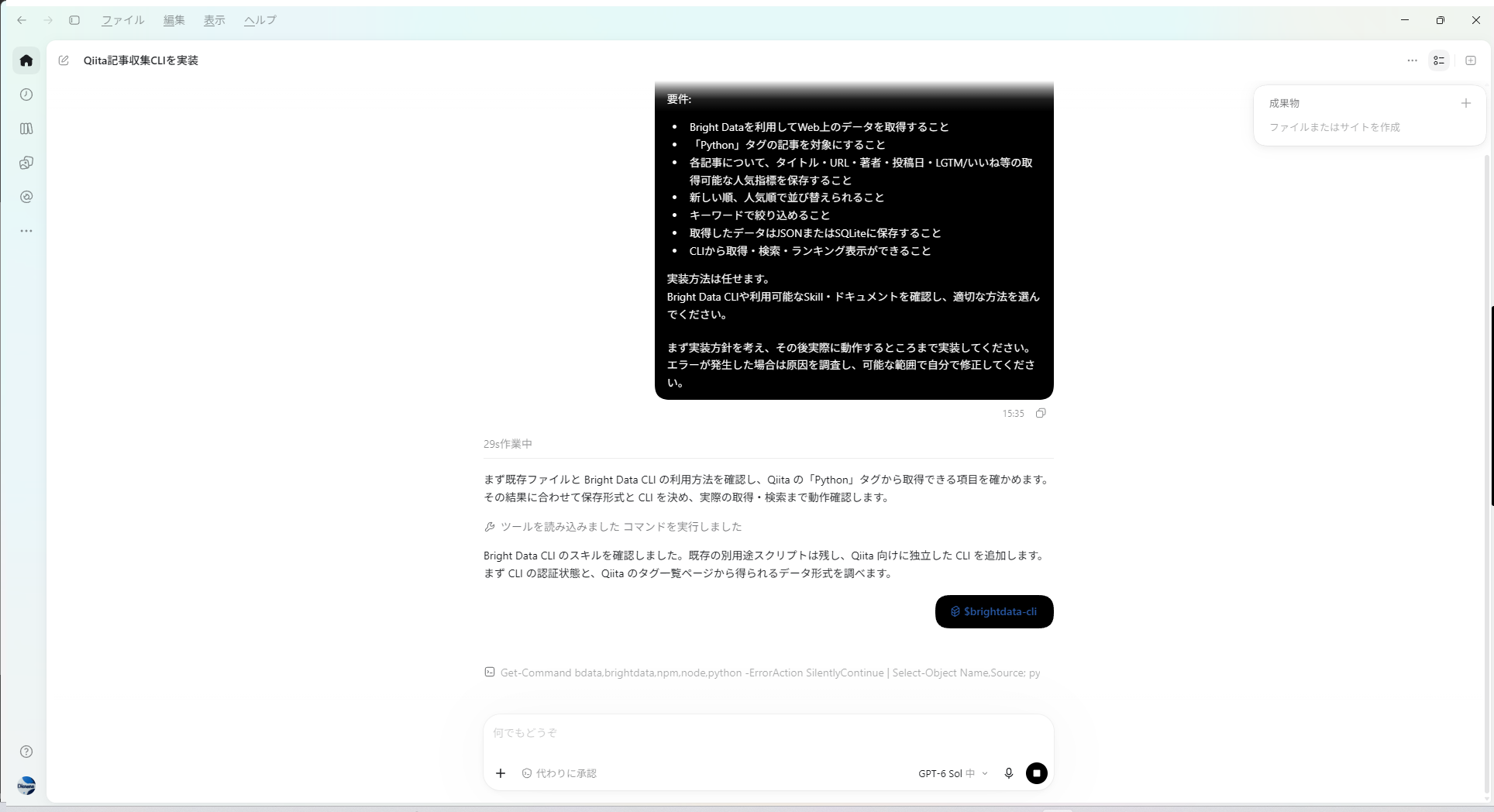
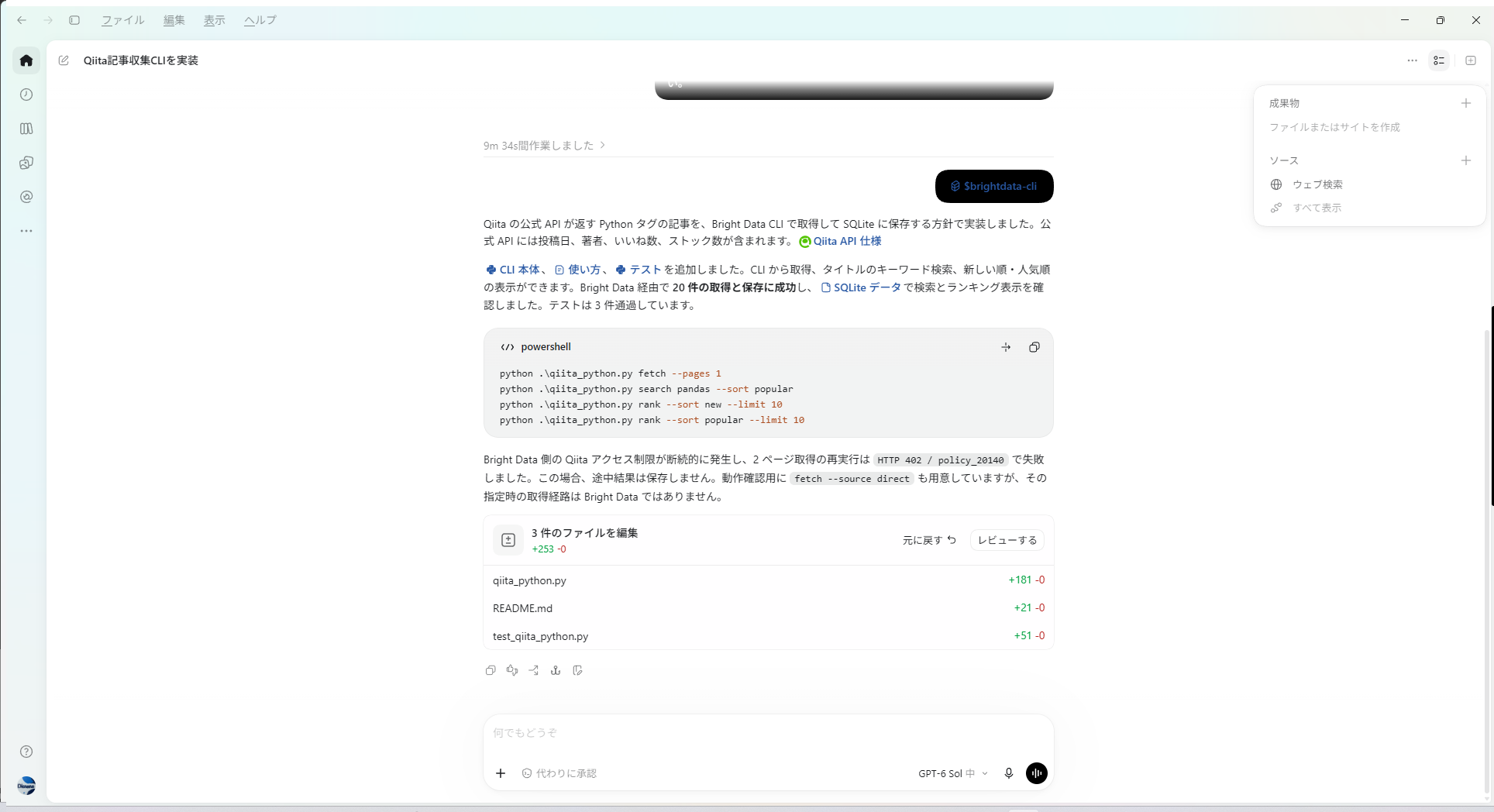
After that, it chose the Qiita official API as the data source. With an API, you can get things like publication date, author, and number of likes in one place, so it was a natural choice for the initial implementation.
The main functions it implemented were:
fetchsearchrank- Save to SQLite
- Test
python .\qiita_python.py fetch --pages 1
python .\qiita_python.py search pandas --sort popular
python .\qiita_python.py rank --sort new --limit 10
python .\qiita_python.py rank --sort popular --limit 10
On page 1, it fetched 20 items and all 3 tests passed.
So far, everything was going smoothly.
HTTP 402 on the second page
It stopped when fetching page 2.
HTTP 402 / policy_20140注意
The name of HTTP 402 is “Payment Required,” but what mattered in determining the cause this time wasn’t the HTTP status itself—it was the policy_20140 returned by Bright Data.
At this point, Codex halted the process, and it didn’t save the partial results to SQLite.
Asking Codex to investigate the cause
Here, I gave additional instructions on the human side.
For the current error, investigate the cause without escaping to direct access—stay using Bright Data. Please also check the CLI’s Skill and the official documentation.
If the current acquisition method has a problem, you can change to a different acquisition method available in Bright Data.
After the fix, confirm that you can actually fetch articles from multiple pages.
I didn’t want it to simply “switch to direct access and bypass it.” I wanted it to investigate the cause while staying via Bright Data.
Upon receiving that instruction, Codex checked the situation using both Web Unlocker and Browser API.
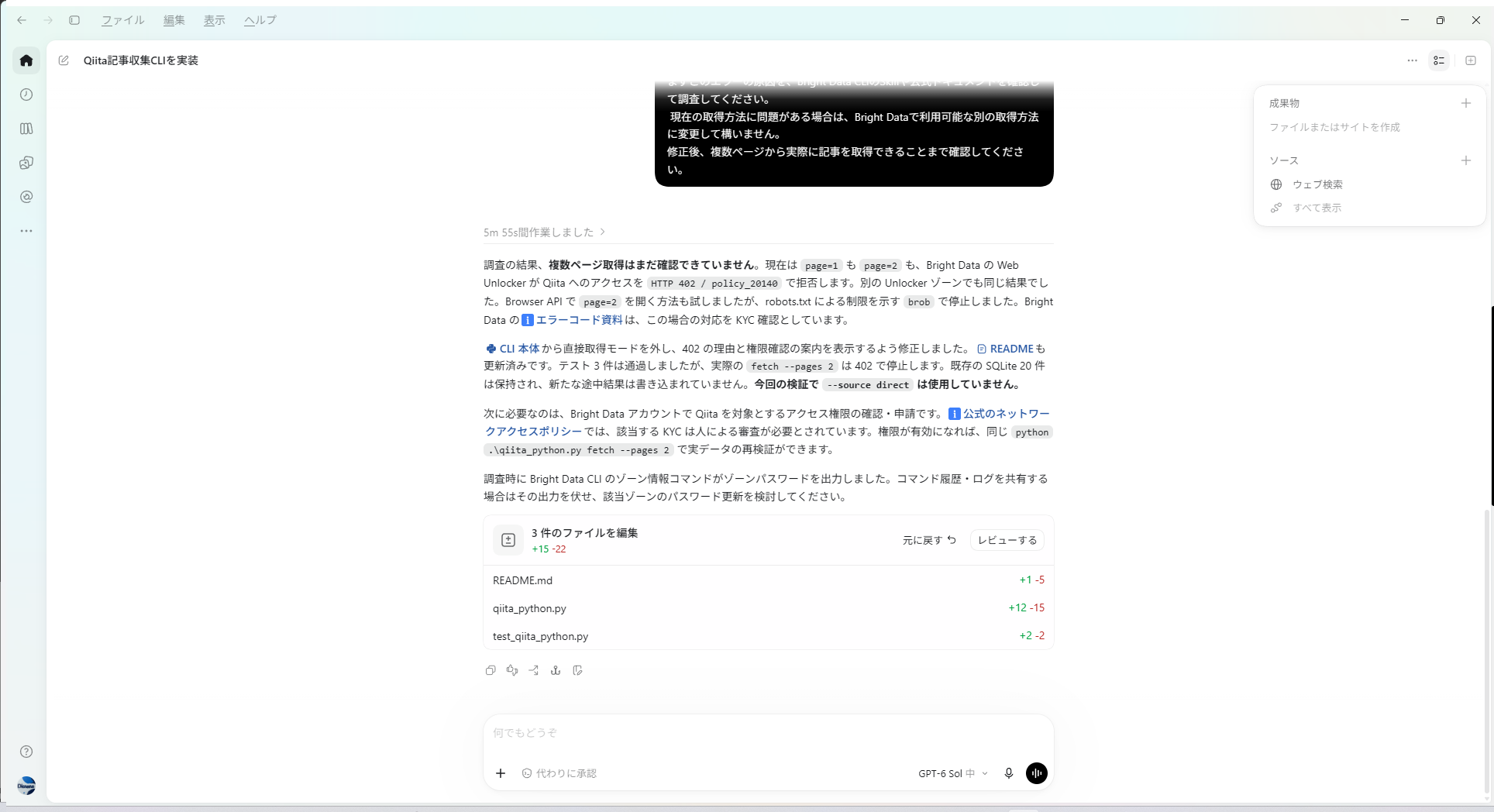
In the first round of investigation, it concluded that it might require KYC or additional permissions.
But at this point, it still hadn’t narrowed the cause down enough.
Looking beyond the initial KYC theory
Even here, I instructed it to re-investigate.
Don’t decide that KYC is the cause just by guessing—report the facts you’ve confirmed separately from your speculations.
Don’t output authentication information or zone passwords.
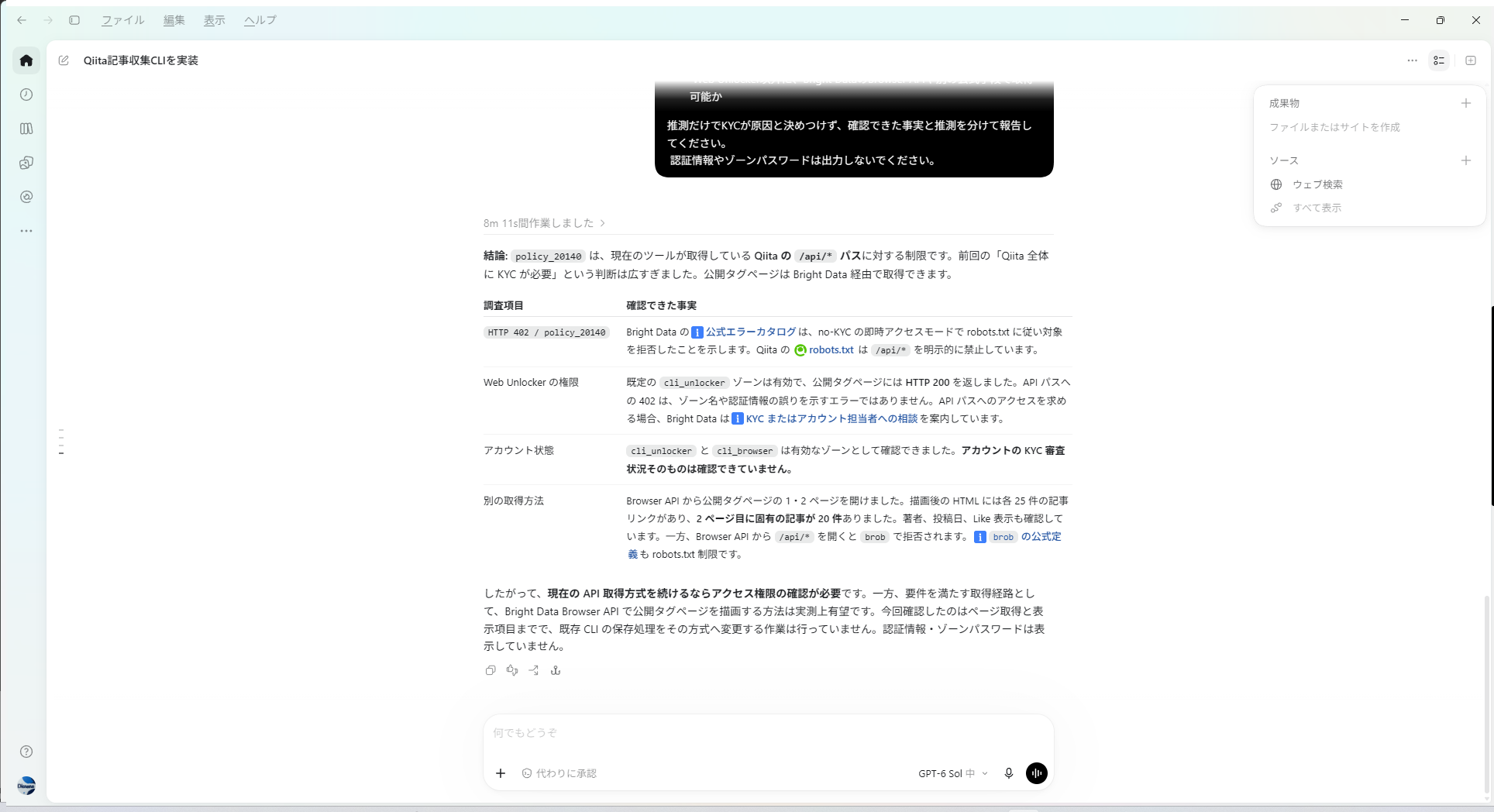
This is what the re-investigation result turned out to be.
| Investigation item | What I confirmed |
|---|---|
policy_20140 | Under the current conditions, /api/*—which is disallowed by robots.txt—was being rejected by Bright Data’s no-KYC immediate access mode |
| Web Unlocker | The public tag page itself can be fetched with HTTP 200 |
| Account status | cli_unlocker / cli_browser are enabled. The KYC review status itself hasn’t been checked |
| Another acquisition method | From the Browser API, it was possible to fetch page 1 and page 2 of the public tag page |
情報
In other words, Qiita as a whole wasn’t inaccessible.
The problem was with the acquisition route for /api/*. The tag list page itself that’s publicly available could still be retrieved via Bright Data.
The initial judgment of “KYC is required” was therefore too broad as an explanation of the cause.
I set the direction for another investigation; Codex compared Web Unlocker and Browser API behavior with robots.txt and the error details.
Switching to Browser API and fetching 45 articles
Codex gave up the approach that used the Qiita official API and switched the design to an approach that uses the Bright Data Browser API to render the publicly available Python tag pages and extract article info.
It also narrowed the target fields to only what could be confirmed from the public pages.
- Title
- URL
- Author
- Publication datetime
- Displayed like count
Items that weren’t visible from the list page—like stock count and comments count—were excluded from what it saved.
In cases where limits differ depending on the acquisition route like this, being able to switch to another method within the same Bright Data was genuinely useful.
python .\qiita_python.py fetch --pages 2
python .\qiita_python.py search Python --sort popular
python .\qiita_python.py rank --sort new
python .\qiita_python.py rank --sort popular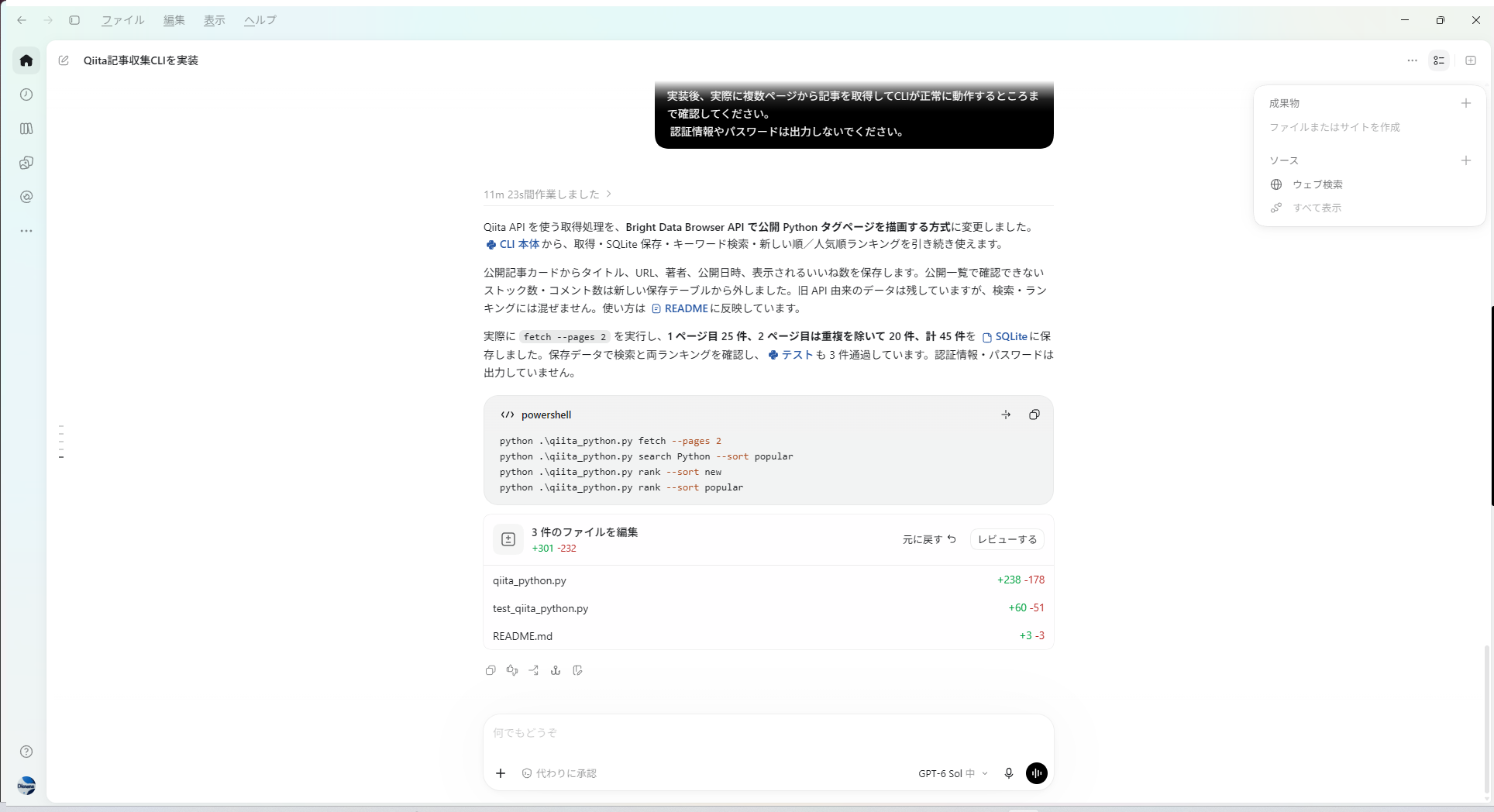
The results were:
- Page 1: 25 items
- Page 2: 20 items after removing duplicates
- Total 45 items saved to SQLite
- Confirmed search/ranking display
- All 3 tests passed
It reached the original requirement: acquisition, saving, search, and ranking display across multiple pages.
How much could I actually leave to Codex?
| What Codex did on its own | What I instructed along the way |
|---|---|
| Research Bright Data CLI / Skill | Don’t escape to direct access |
| Choosing the Qiita API-based approach | Investigate the cause while staying via Bright Data |
| Implementing CLI / SQLite saving / tests | Don’t assume KYC—separate facts from speculation |
| Concrete investigation using Web Unlocker / Browser API | Don’t output authentication info |
| Switching to and re-implementing the Browser API approach |
情報
It wasn’t fully autonomous, and it wasn’t like humans just handed it the answer.
Humans set the approach—how it should investigate—while Codex advanced the selection of specific investigation tactics and the implementation.
A caution when AI agents use external services
The biggest “that was scary” moment in this whole process was when, during the investigation, the Bright Data CLI’s zone info command output the zone password.
注意
The screenshots and command history used in this article are checked before publication to make sure they don’t include authentication details, passwords, tokens, etc.
When letting an AI agent interact with an external service’s CLI or API, it’s probably best to assume that secrets can end up mixed into logs or even the command output itself.
Also, even when you’re looking at primary information, you can’t always trust that its interpretation is correct.
In this case too, I didn’t just accept the initial judgment of “KYC is required” as-is, and by digging one step deeper, it got narrowed down to the restriction on the /api/* side.
A note on Scraper Studio Collectors
In the Bright Data CLI, there’s also a mechanism where you create a Scraper Studio Collector with bdata scraper create, and then reuse the Collector ID with bdata scraper run.
In this case, Codex itself chose the acquisition method of Qiita API → Browser API, so I didn’t base the validation mainly around the Collector.
If I try again next, I’d like to try a setup where I fix the Collector ID somewhere like CODEX.md and have it reused across sessions.
Closing thoughts
What was interesting about this time wasn’t that Codex chose the correct answer from the start. It was that after it failed, it was able to switch to a different acquisition method and rebuild the implementation.
Along the way, I also needed additional instructions from humans like “don’t run away to direct access” and “don’t assume it’s KYC.”
Even so, without having to teach it specific investigation methods or provide the exact fix code, it still progressed to the point where it tried Web Unlocker and Browser API, narrowed down the cause, and ultimately fetched 45 articles across two pages.
It may not be “just let it do everything,” but it felt like we can hand quite a lot of development work involving external services to Codex.
The Bright Data service used here
Bright Data supports security/compliance standards like ISO 27001 and SOC 2, and has been adopted by 20,000+ companies.
For this validation, I only targeted the tag pages and article information of Qiita that are publicly available.
情報
Try Bright Data
You can register from this dedicated link.
- Via the dedicated link, you get a $20 free credit intended for API verification (as described)
- Scraper Studio has a free tier of 5,000 page loads per month
- No credit card registration required
※ The link above is Bright Data’s dedicated tracking link.
注意
The details of the benefits, eligible plans, and combined-use conditions may change. Please check the conditions shown when you register and what appears in your dashboard.