Now officially listed on the Dify Marketplace!
You can import it into your environment right away and try it from the link below. Try GEO & Brand Intelligence Analyzer
There’s something I want you to try right now
Open ChatGPT and ask this:
“Please tell me what you recommend in the category of 〇〇 (your brand’s or product’s category).”
Did your brand or product show up in the answer you got back? If it did, was it in a positive context? Were competitor names mentioned more often?
If you felt like “it didn’t show up as much as I expected,” that’s where you stand right now. Not in Google rankings, but in AI’s head. We’re in an era where this gap is quietly widening.
GEO, the concept that comes after SEO
Have you heard the term GEO (Generative Engine Optimization)?
If SEO is optimization for ranking high on Google, GEO is optimization to make AI tools like ChatGPT and Gemini recognize your brand as “the one for this category.”
As AI search usage grows, there are cases where being “recommended by ChatGPT” matters more than being “No. 1 on Google.” And yet, there are still very few people seriously working on GEO.
I think one reason is this:
“First of all, there’s no easy way to find out how AI currently thinks about my brand.”You can manually open ChatGPT, try questions from different angles, compare answers between Gemini and ChatGPT, and organize the results… But if you try to do that properly, it takes way too much time, and you can’t exactly ask the same question every single time.
I built this tool to break through that “current-state awareness wall.”
What I built: GEO & Brand Intelligence Analyzer
It’s a Dify workflow template.
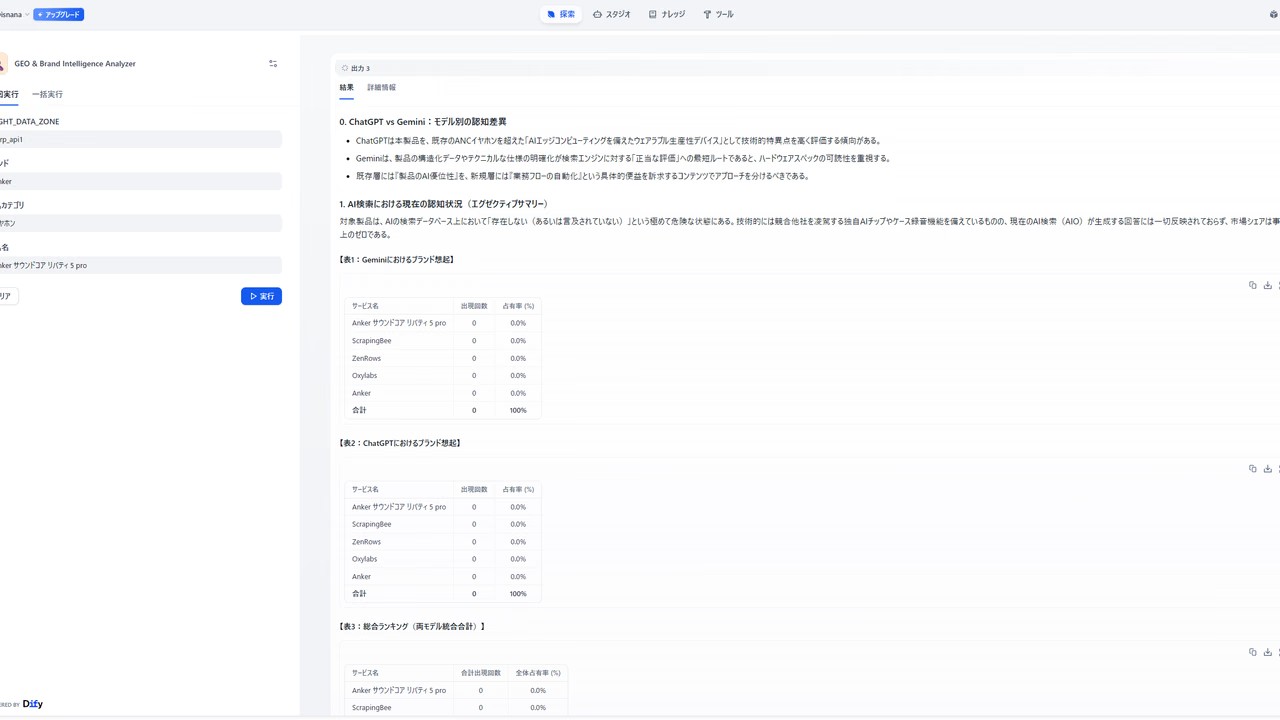
The inputs are simple, just four fields.
| Input item | Example |
|---|---|
| BRIGHT_DATA_ZONE | serp_api1 |
| Brand | Anker |
| Product category | Earphones |
| Product name | Anker SoundCore Liberty 5 pro |
Just run it and wait a few minutes, and it outputs a diagnostic report showing how ChatGPT and Gemini each evaluate your product.
The mechanism behind it, explained honestly
Phase 1: Collect “raw” evaluations from the web
Gemini generates the best Google search query from the brand, category, and product name, then sends it to Bright Data’s SERP API.
Bright Data’s SERP API fetches Google search results in real time, so you can pick up “how the web is evaluating it right now.” Not clean official-page info, but real mentions from review sites and comparison articles.
Phase 2: Automatically generate an anonymous prompt that hides the product name
This is the core of the tool.
Based on the collected web information, Gemini automatically generates an anonymous prompt like this:
“I’m looking for earphones that meet the following conditions:
- Active noise cancellation
- Continuous playback of XX hours or more
- Price range around ¥〇〇
- Multi-point connection support

Please recommend the best options in this category.”Why make it anonymous? If you ask directly by brand name, AI tries to answer with “information about that brand.” But what we want to know is: “What does AI naturally recommend in the same category?” Only when you ask with anonymous specs do you get answers closer to AI’s real instincts.
Phase 3: Send it to both ChatGPT and Gemini at the same time
This is the most interesting part of the tool.
Bright Data’s LLM Scraper can send prompts not only to websites, but also to the AI chatbots themselves—ChatGPT and Gemini—and return the answers as structured data. In other words, you can scrape AI.
The generated anonymous prompt is sent to both ChatGPT and Gemini through Bright Data at the same time, and their responses are collected.
flowchart TD
    A["Dify\nGenerate anonymous prompt"] -->|Send| B["Bright Data\nLLM Scraper"]
    B --> C["ChatGPT\nchatgpt.com"]
    B --> D["Gemini\ngemini.google.com"]
    C -->|"'〇〇 is recommended'"| E["Collect and structure responses"]
    D -->|"'△△ is the strongest candidate'"| E
    E --> F["Dify\nComparison analysis with Gemini"]
    F --> G["Output diagnostic report"]
If you try to do this manually, you have to open ChatGPT, paste the prompt, copy the answer, then open Gemini and do the same thing… over and over again. This automates all of that.
Phase 4: Generate a gap analysis report
After receiving responses from both AIs, Gemini outputs a Markdown report with the following structure:
- ChatGPT vs Gemini: How recognition differs depending on the model
- Current AI perception: How the brand is positioned in AI search right now
- Gap between ideal and reality: Where the brand’s true strengths are not getting across
- Competitor comparison: Analysis of the specific reasons AI recommends competitors
- GEO improvement actions: Concrete proposals for keyword strategy and content initiatives
- Conclusion
“Won’t API costs be high?” Here’s the answer
If you’re accessing ChatGPT and Gemini at the same time and doing web search too… it makes sense to worry about API charges.
You do not need to set an OpenAI API key in Dify at all.There are only two kinds of API keys used in this workflow.
- Google Gemini API (free tier available) → query generation, analysis, report generation
- Bright Data API (free signup, initial credits included) → web search, access to ChatGPT/Gemini, data structuring — everything is handled here
Access to ChatGPT, access to Gemini, web search, and data structuring are all handled within Bright Data’s platform.
The reason this costs less than calling the OpenAI API directly is that Bright Data’s LLM Scraper handles scraping and data structuring in a single request. From Dify’s perspective, it’s just sending one HTTP request, so the design keeps token charges to a minimum.
Setup steps
No code required.
1. Prepare your Dify environment
The free plan on Dify Cloud is fine. Get a Gemini API key from Google AI Studio and configure it.
2. Sign up for Bright Data
You can register here. Signup is free, and you get an initial trial credit, so you can verify it works for free first. After registering, create a Zone for the SERP API in the console and issue an API key.
3. Register the API key in Dify
Set Bright Data’s API key in the Dify environment variable BRIGHT_DATA_API_KEY.
4. Import the template and run it
Just import it from the marketplace, enter the brand and product information, and run it.
The template is already public
You can import it into your environment right away and try it from the link below. Try GEO & Brand Intelligence Analyzer
Who I want to use this
- People who are curious about how their product or brand is seen by AI
- People who want to start GEO but first need to understand the current situation
- People who are interested in whether ChatGPT and Gemini evaluate things differently
- Engineers looking for interesting ways to use Bright Data and Dify
Closing thoughts
People working on SEO usually start by checking their current search rankings. GEO should be the same: the starting point should be to understand how AI sees you right now.
But until now, there was no easy way to do that.
When you look at the report, you might feel a little discouraged because competitor names show up more often than expected. But that’s what it means to know the reality, and only then can you finally build a GEO strategy. That’s much better than leaving things untouched while not knowing.
I’ll announce it again once the template is published, so bookmark this and wait for it. In the meantime, it’ll go more smoothly if you create a Bright Data account first.
Bright Data signup (free, with trial credit) → https://get.brightdata.com/mnjx7e