Now officially listed on the Dify Marketplace!
You can import it into your environment and try it right away from the link below. Try AI Tech-Stack Insight Evaluator
To be honest, isn’t technology selection a pain?
I remember it clearly: it was the day I had to decide on the backend framework for a new project.
Should we go with FastAPI, or is there another option? Whether it’s a solo side project or a school project with a team, this kind of situation always comes up. The moment you decide to “just compare a few options,” the endless research begins.
You open Google. You read English tech blogs. You dig through Reddit threads. You check GitHub star trends. You read Zenn articles. Before you know it, it’s evening, and all you have is a messy pile of notes and a half-filled spreadsheet.
“This can’t be the work I’m actually supposed to be doing.”
I’m pretty sure the people reading this article have felt the same way.
The real problem is that gathering and organizing information eats up all your time
If you break down the issue in technology selection, it looks like this:
- Official docs are full of positioning talk and don’t honestly mention weaknesses
- Even if you ask ChatGPT, its knowledge cutoff means the latest trends aren’t reflected
- Searching the web takes huge amounts of time just to filter freshness and noise
- Turning everything into a final report is another job in itself
In short, all the time gets sucked away by gathering the material needed to make a decision.
The decision itself only takes 10 minutes. But gathering the material takes 8 hours. That doesn’t make much sense, does it?
So I built “AI Tech-Stack Insight Evaluator”
I built it as a Dify workflow template. It’s also officially listed on the Dify Marketplace.
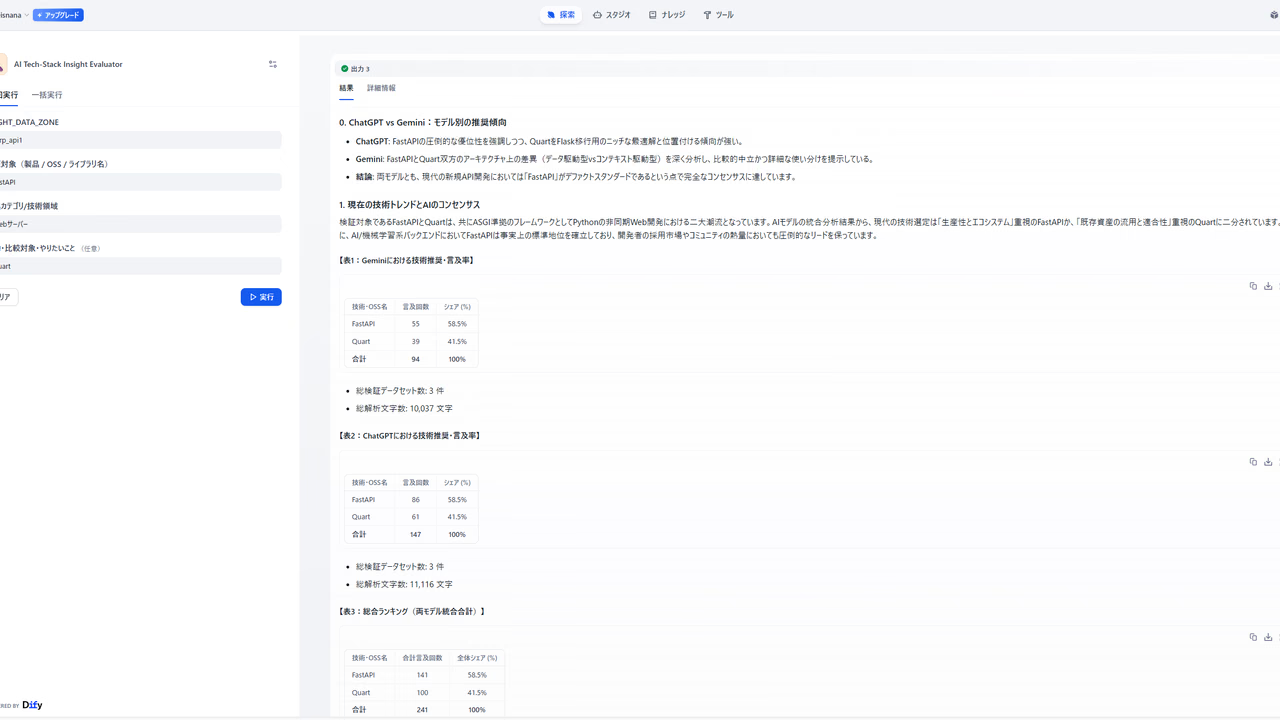
Using it is absurdly simple. There are only three input fields.
| Input item | Example |
|---|---|
| Target to evaluate (tech / OSS / product name) | FastAPI |
| Category / technical area | Web server |
| Comparison target / what you want to do (optional) | I want to compare it with Quart |
Just enter those three items and hit run.
A few minutes later, you get a structured report with competitive comparisons and mention frequency analysis, the kind of thing a veteran engineer would spend a full day putting together.
Let me honestly explain what’s happening under the hood
For anyone thinking, “Isn’t this just asking ChatGPT?”, let me properly explain what’s inside the workflow.
Step 1: The LLM automatically generates the best search queries
Based on the input tech name, category, and comparison target, Gemini builds multiple optimal Google search queries.
The key point is that if a comparison target is specified, it generates direct comparison queries; if not, it automatically infers the industry de facto standard and builds queries from that. This isn’t just plain search—it’s context-aware query design.
Step 2: Bright Data’s LLM Scraper collects real-world evaluations from the web
This is the core of the workflow.
When you send the search queries to Bright Data’s Web Scraper API (LLM Scraper), Bright Data’s platform uses ChatGPT to read the web pages and extract only the necessary information as structured data.
The process runs asynchronously (polling style). After Dify sends the request, it loops by periodically calling the /datasets/v3/progress endpoint to wait for the data to be ready.
[Dify] -> Send request to Bright Data API
         ↓
[Loop] -> Processing complete? -> NO -> Wait a bit -> Check again
         ↓ YES
[Dify] -> Receive structured data
Step 3: Python code accurately extracts and aggregates competitive keywords
For the text data it receives, Gemini first extracts competitor service names, OSS names, and alternative technology names as a JSON array.
At this stage, the prompt is carefully designed to exclude generic IT terms like API, JSON, and HTTP. It’s a way to keep ordinary words from sneaking into the competitor list.
Next, Python code tallies the frequency of appearance.
# Accurately count occurrences of each target and sort by frequency
for kw in final_targets:
    escaped_kw = re.escape(kw)
    count = len(re.findall(escaped_kw, merged_text, re.IGNORECASE))
    stats_rows.append((count, f"| **{display_name}** | {count} 回 |"))

stats_rows.sort(key=lambda x: x[0], reverse=True)
What comes out is a first-pass aggregation table in this format:
### 【Accurate first-pass aggregation results by Python × AI integration】

| Analysis target keyword | Number of occurrences (mention frequency) |
| :--- | :---: |
| **★ FastAPI (target under evaluation)** | 312 回 |
| **Flask**               | 187 回 |
| **Django**              | 143 回 |
| **Quart**               |  89 回 |

* Total number of verified datasets: 8
* Total analyzed characters: 42,381
Step 4: Gemini generates the final report
Once it has all the data, Gemini outputs a Markdown-formatted technology selection report. From here, you just read it.
Answering the question: “Won’t OpenAI API costs explode?”
This was something I was worried about at first too.
“If we load dozens of web pages into ChatGPT, won’t the token bill get ridiculous?”
The answer is, we do not set any OpenAI API key in Dify at all.
Structurally, it looks like this:
- Dify side → Only Google Gemini is configured, using a free tier or low-cost setup
- Bright Data side → All the heavy processing, from loading HTML to extracting structured data, is completed inside Bright Data’s platform
The key point is that this workflow does not call the OpenAI API directly. Bright Data’s LLM Scraper handles scraping and data structuring together in a single request, so token usage is significantly lower than calling the OpenAI API yourself. Think of it as offloading the heavy lifting to Bright Data.
The reason it can achieve both high accuracy and low cost is this division of roles.
Setup steps
It works in three steps, with no code required.
1. Prepare your Dify environment
The free plan for Dify Cloud is fine. Get a Google Gemini API key and set it up.
2. Create an LLM Scraper Zone in Bright Data
Sign up for Bright Data here. Registration is free, and you’ll also get an initial trial credit, so you can test it for free first. After signing up, just create a Zone for LLM Scraper in the console and get your API key.
3. Register the API key in Dify and import the template
Register the obtained key in the Dify environment variable BRIGHT_DATA_API_KEY. Import this template from the Marketplace and you can use it the same day.
Now officially listed on the Dify Marketplace!
You can import it into your environment and try it right away from the link below. Try AI Tech-Stack Insight Evaluator
Intended use cases
- Individual developers: As comparison material when choosing the tech for your next project
- Team development: When you want to back up a technology proposal with data for the team
- Learning purposes: When you want to quickly understand “How is this technology being evaluated right now?”
- Non-engineers: When you want an objective view of a competitor product or trending tool’s position
Just enter the product name in the input field, and you get a report that even engineers can read and find convincing.
Closing thoughts
“Information gathering and organization” is the kind of work AI is best at. And “making decisions based on that information” is, for now, human work.
Just being conscious of that split lets you use the time that used to disappear into research for the things you actually want to do. Once you experience it, it’s so comfortable you won’t want to go back.
I’ll announce it again once the template is published, so save this and wait for it. In the meantime, it’ll go more smoothly if you create a Bright Data account first.
Bright Data sign-up (free, with trial credit) → https://get.brightdata.com/mnjx7e
I hope this helps reduce even a little of the time you spend struggling with technology selection.