情報
This article is a PR post for Bright Data.
For the verification, I used the real dashboard I run for Disnana. I’ll talk not only about the cases that were fixed by Self-Healing, but also the ones that couldn’t be fixed all the way.
Building a scraper itself has gotten pretty easy.
If you give it a URL and the data you want, AI will even write the code for you. Last time, I used Bright Data’s Scraper Studio and tried building a scraper from natural language. I wrote up that verification in the previous article.
But what’s really annoying in production is what comes after that.
A scraper that worked until yesterday suddenly stops returning data after a site renewal.
Sometimes only the CSS class names change, and sometimes the DOM structure or rendering method changes too. For a bigger renewal, even what you’re supposed to extract from that page changes in the first place.
So this time, I used Bright Data Scraper Studio’s Self-Healing and tested whether it could keep up with three generations of the same dashboard.
Results first
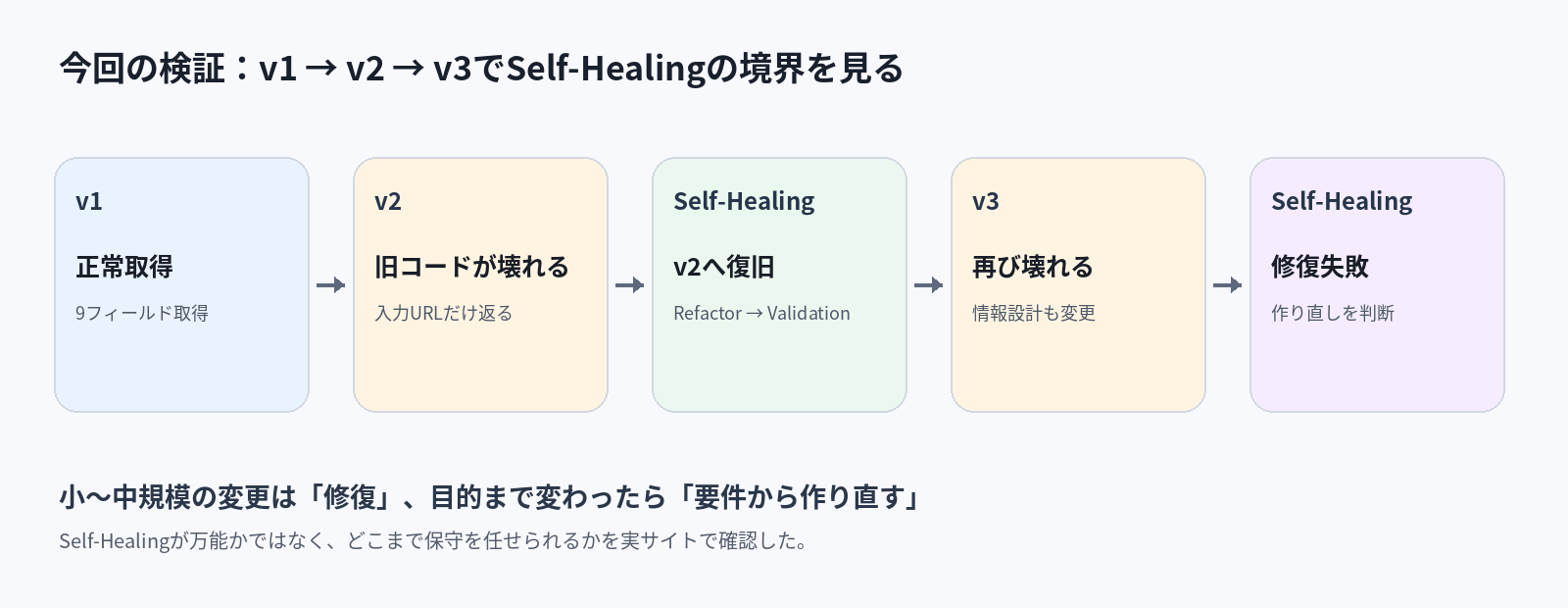
| Verification | Result |
|---|---|
| v1 | Retrieved successfully |
| Scraper for v1 → v2 | Execution completed, but the expected data disappeared |
| Self-Healing for v2 | Fixed URL, selectors, waiting logic, etc., and recovered everything that could be recovered |
| Scraper for v2 → v3 | Expected data could not be retrieved again |
| Self-Healing for v3 | Repeated refactor and validation, but repair ultimately failed |
情報
What I most wanted to know this time wasn’t “Can Self-Healing fix anything?” but how far I can leave repairs to it, and when I should rebuild instead.
The three screens used here are actual version transitions
The target is Disnana’s dashboard.
From v1 to v2, the UI and DOM structure changed significantly, while still being the same dashboard.
In v3, I went further and redesigned the page as a “overall overview.” The focus shifted to server protection status and server lists, and the meaning of the displayed information itself changed from v1 and v2.
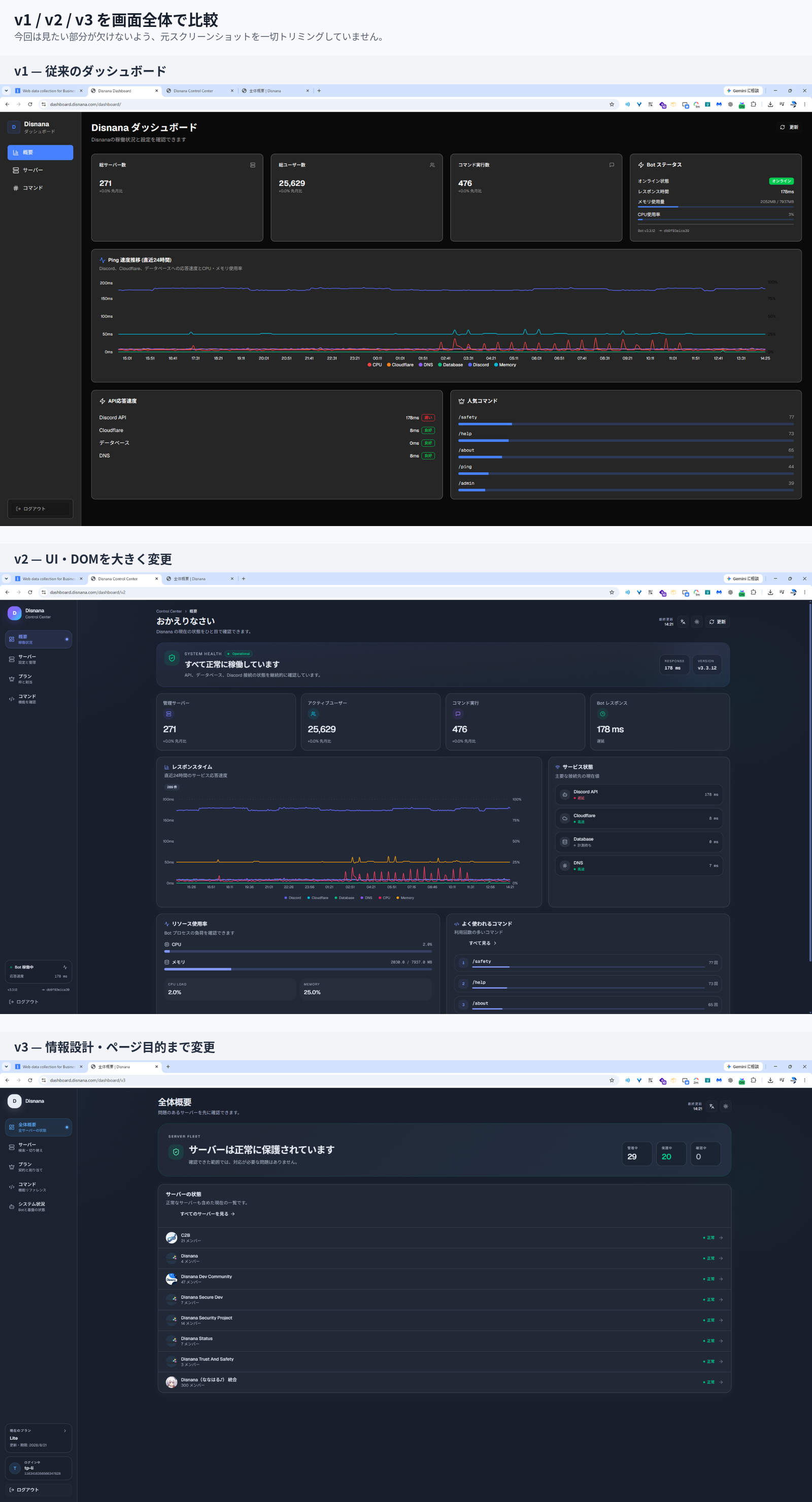
Roughly speaking, the changes were:
| Version | Scope of change |
|---|---|
| v1 | Baseline |
| v2 | UI and DOM structure changes |
| v3 | UI, DOM, displayed information, and even the page purpose changed |
With these three generations, I could test both a “normal site change” and a change that makes even the old scraper’s existence questionable, on the same site.
In v1, all 9 items were retrieved correctly
First, I built a scraper for v1.
The items to extract were these 9:
dashboard_title
dashboard_description
total_servers
total_users
command_executions
bot_status
response_time
memory_usage
cpu_usage
The Parser code was set up to fetch each card and text using CSS selectors matched to v1’s DOM.
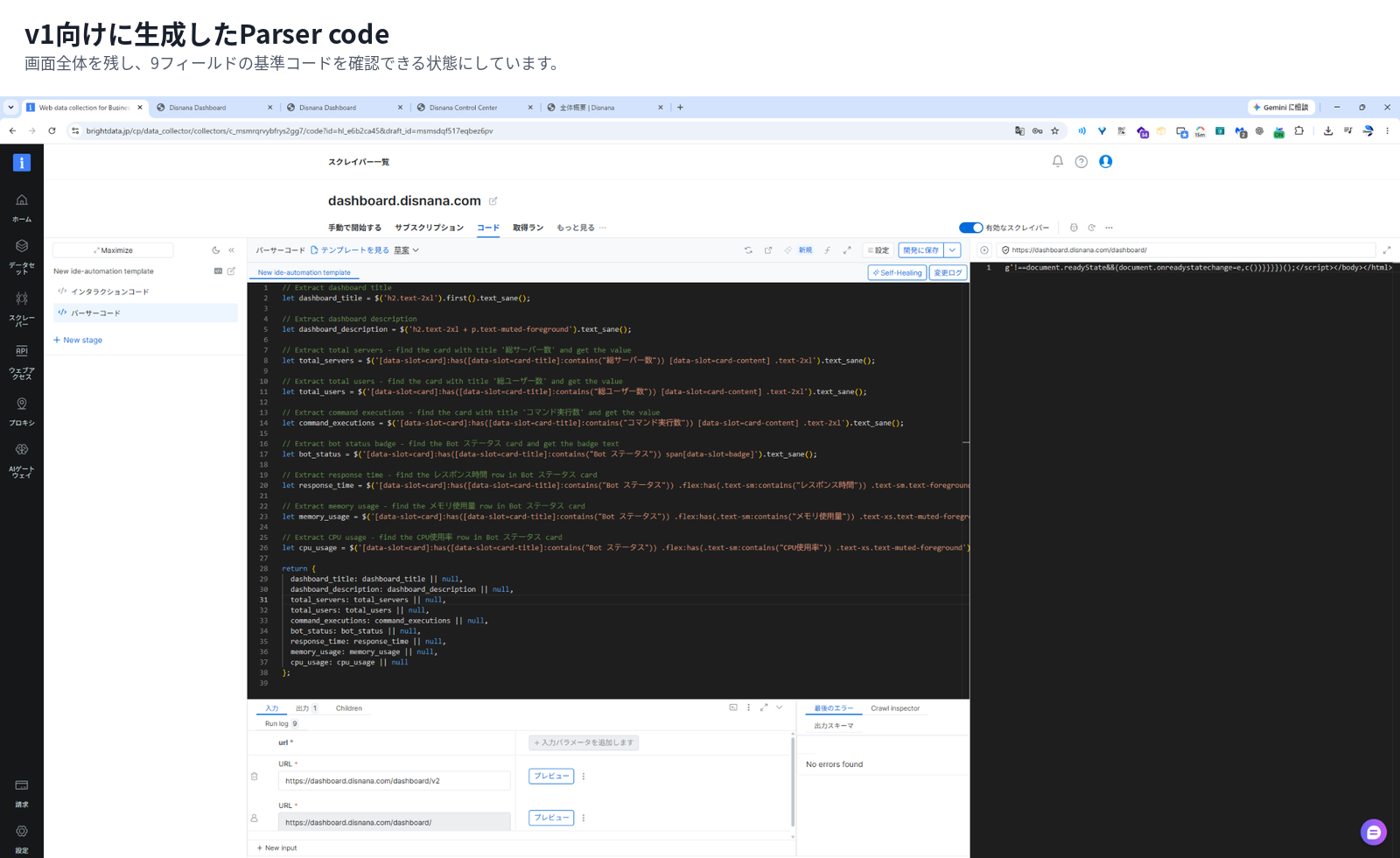
Using that as the baseline, I first broke it by moving to v2.
When I switched to v2, the “success rate was 100%” but the contents disappeared
Without changing the scraper code, I only changed the input URL to v2 and ran it.
https://dashboard.disnana.com/dashboard/v2This is all that came back:
[
  {
    "input": {
      "url": "https://dashboard.disnana.com/dashboard/v2"
    }
  }
]
The fields that should have been there were gone.
Even so, in the Runs screen, the job itself was not treated as a failure, and it showed 100.00% success rate.
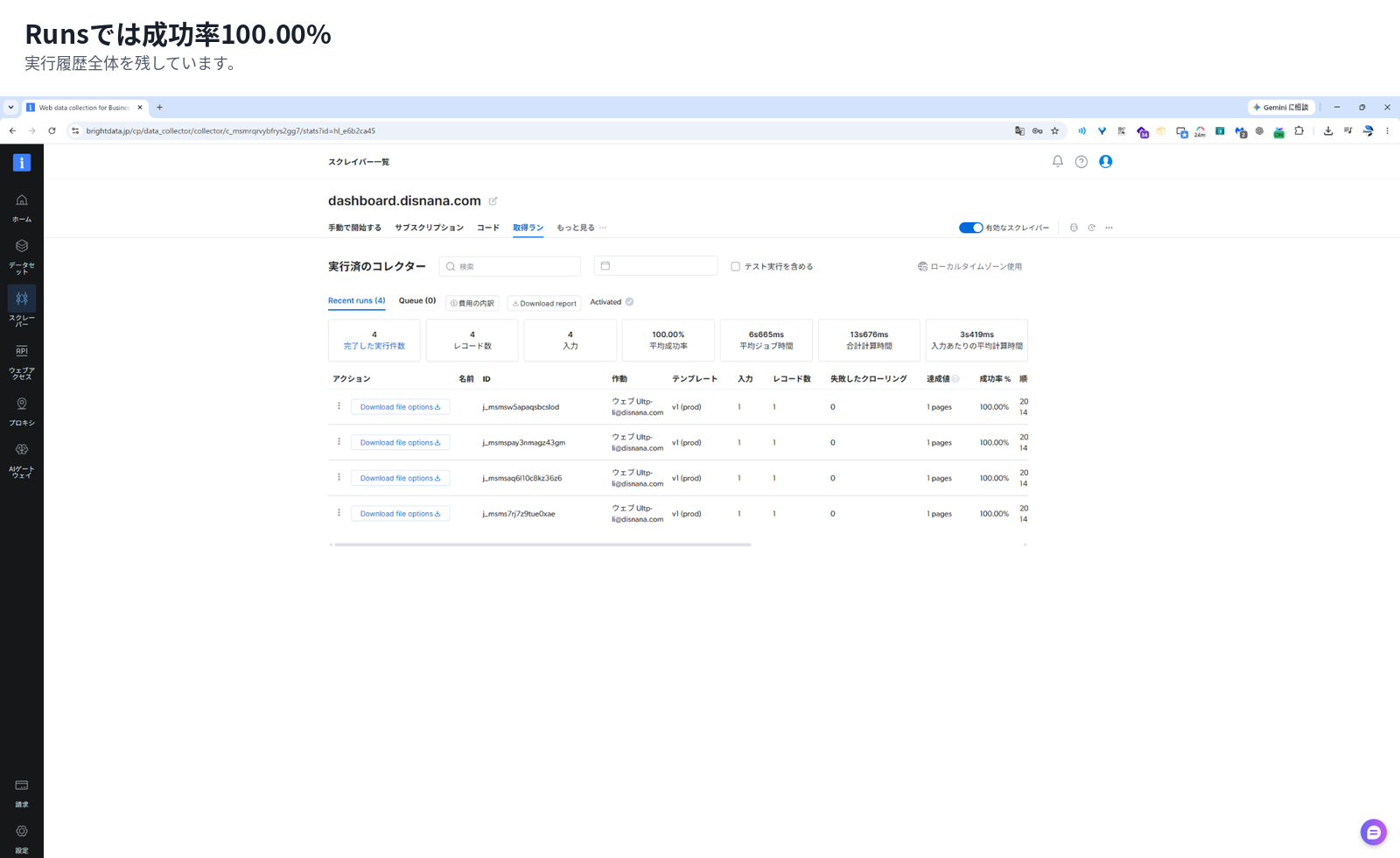
This left a strong impression on me.
“The process finished normally” and “the data I wanted was correctly retrieved” are not the same thing.
If it threw an exception and stopped, monitoring would catch it more easily. On the other hand, a failure mode where the process succeeds but the output is missing data is much easier to miss.
With Bright Data’s Self-Healing too, after the fix, the flow is to check in Preview whether the expected data is coming back before applying it to Production.
注意
For scraper monitoring, it seems better to check not only HTTP errors and job failures, but also whether the required fields exist and whether the values make sense.
Tell Self-Healing that the site moved to v2
Self-Healing is a feature in Scraper Studio that generates fix proposals for existing code from natural language. It can also be used to fix cases where the target site changed and the scraper no longer returns the expected data.
The official details are in the Self-Healing documentation.
This time I asked it like this:
The site moved to v2, and the data that used to be retrievable is no longer coming back.
Please adjust the scraper to match the current v2 page.
Keep the existing output items and field names unchanged,
and only modify selectors and retrieval logic as needed.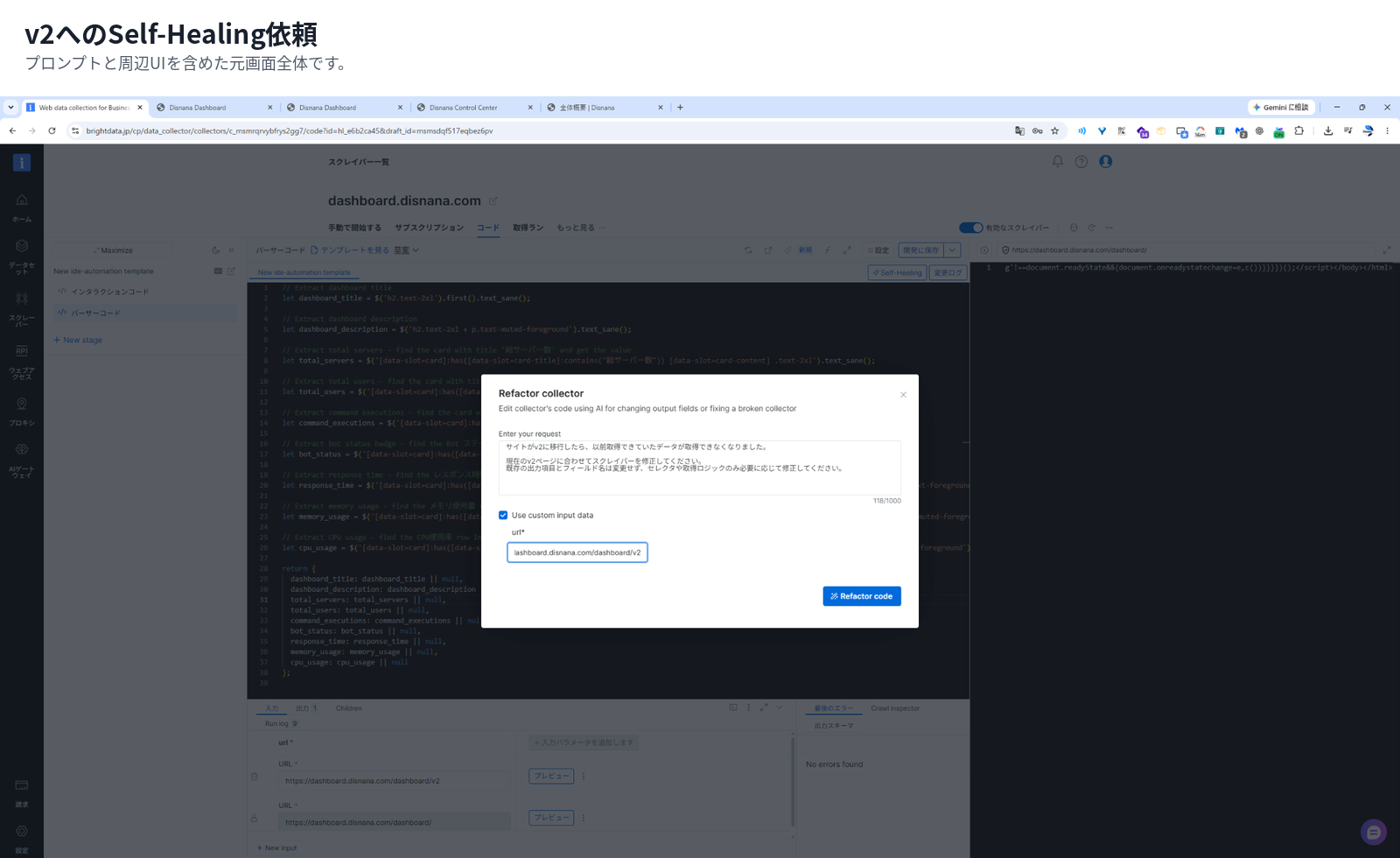
The key point was that I explicitly asked it to preserve the existing field names.
Self-Healing can also be used to change output items, but this time I wasn’t asking it to invent a new scraper. I wanted to see how well it could preserve the existing output contract.
It wasn’t just “fix it and done” — there was Validation in between
When I ran it, the screen showed steps like these:
Starting automation...
Planning...
Refactoring code...
Validating results after refactor...
Refactoring code...
Validating results after refactor...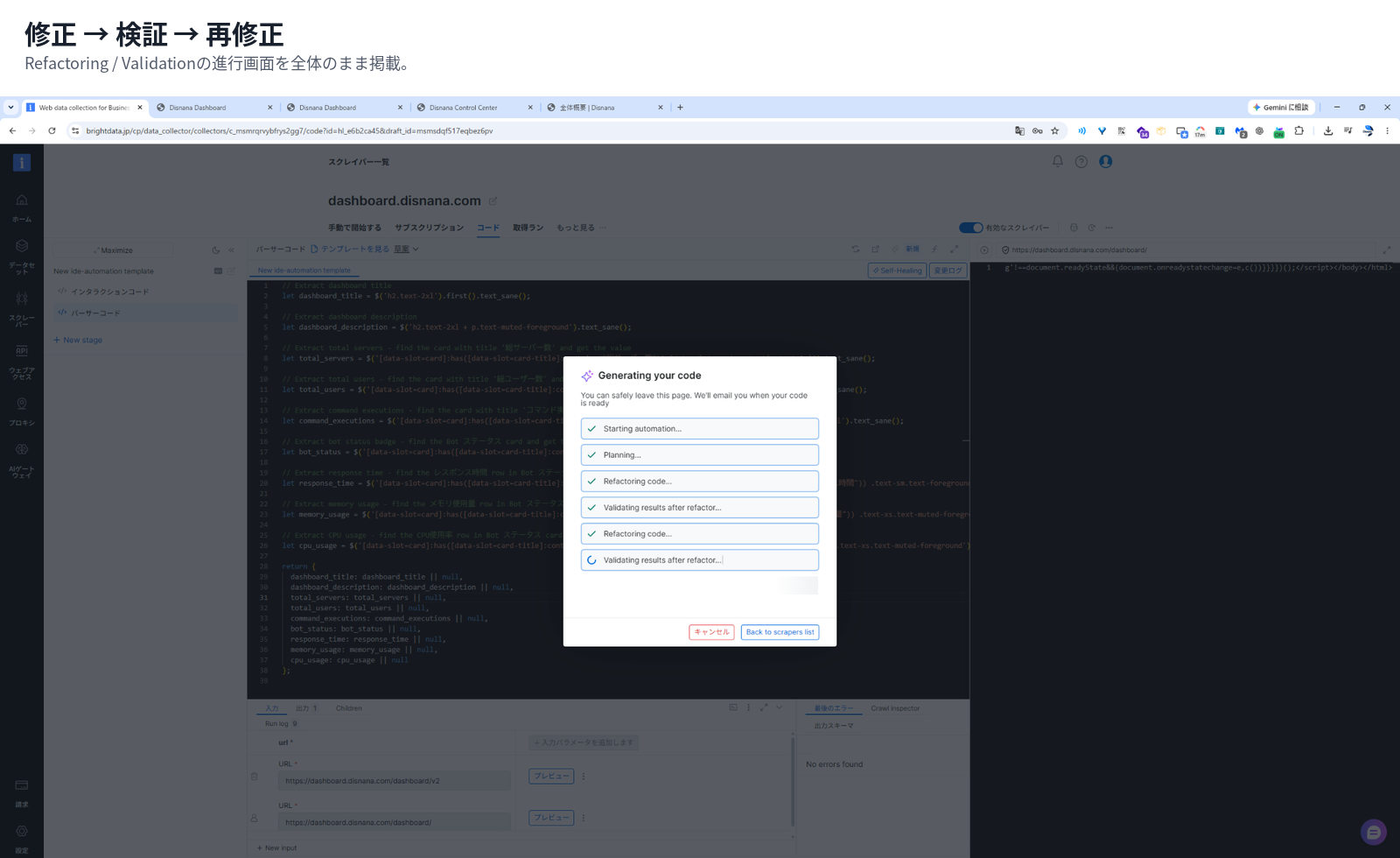
At least in the UI, the flow was:
Refactor → Validation → Refactor again if needed
I can’t say exactly what criteria it uses internally to retry, so I won’t make a hard claim there. But from the screen, I could confirm that it’s not just “AI writes code once and that’s it.”
It changed not only the selectors, but also the URL and waiting logic
Looking at the diff after the fix, the selectors for v1 were changed to match v2.
But that wasn’t all.
The input URL was also updated from:
/dashboard/to:
/dashboard/v2And wait() was added to the Interaction code too.
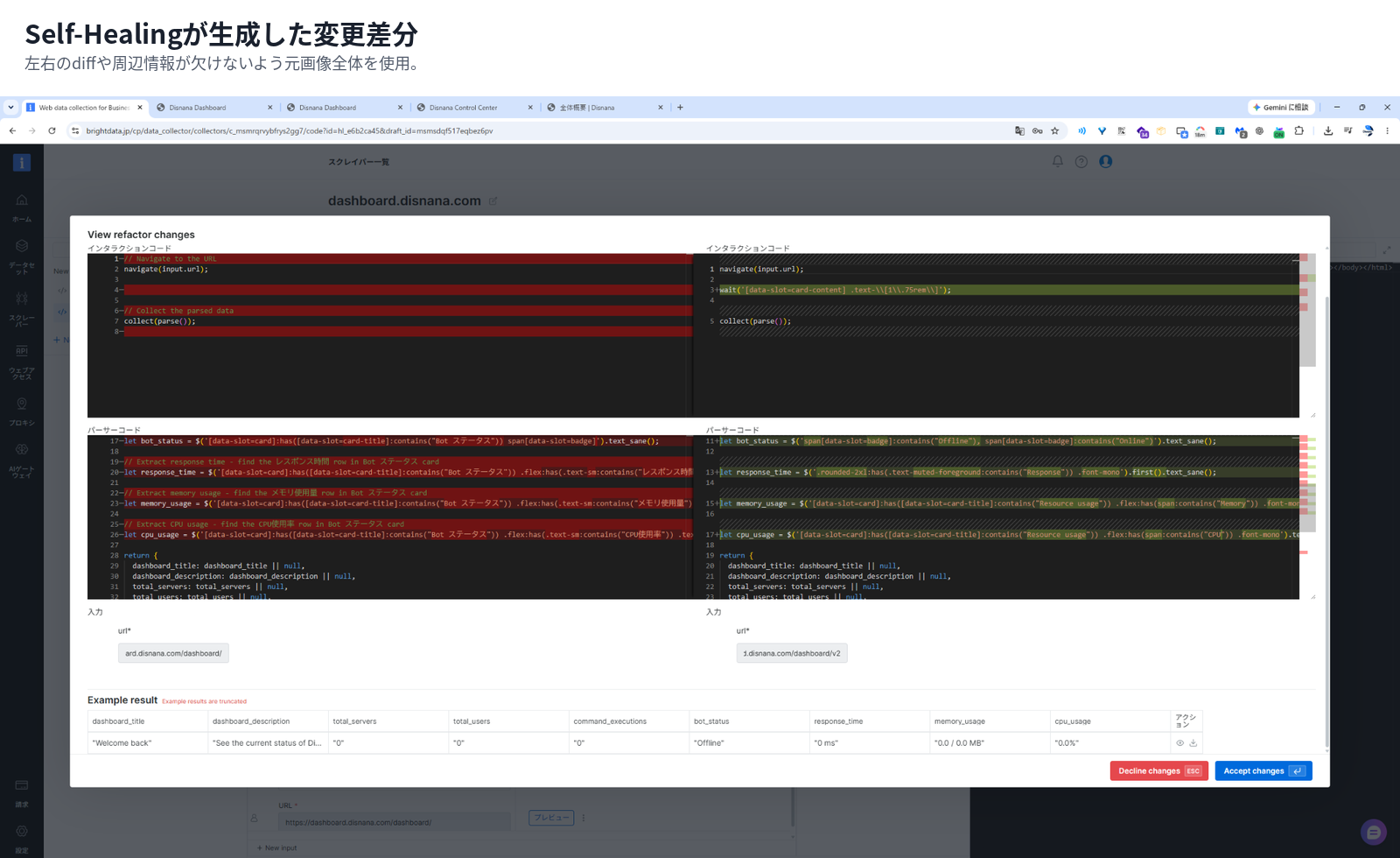
This time I had given it the context that the site moved to v2, along with Custom input, but it was honestly convenient that it fixed not just the selectors but also the target URL.
Adding wait() required switching to Browser worker
When I tried Preview as-is, it now showed Incompatible worker.
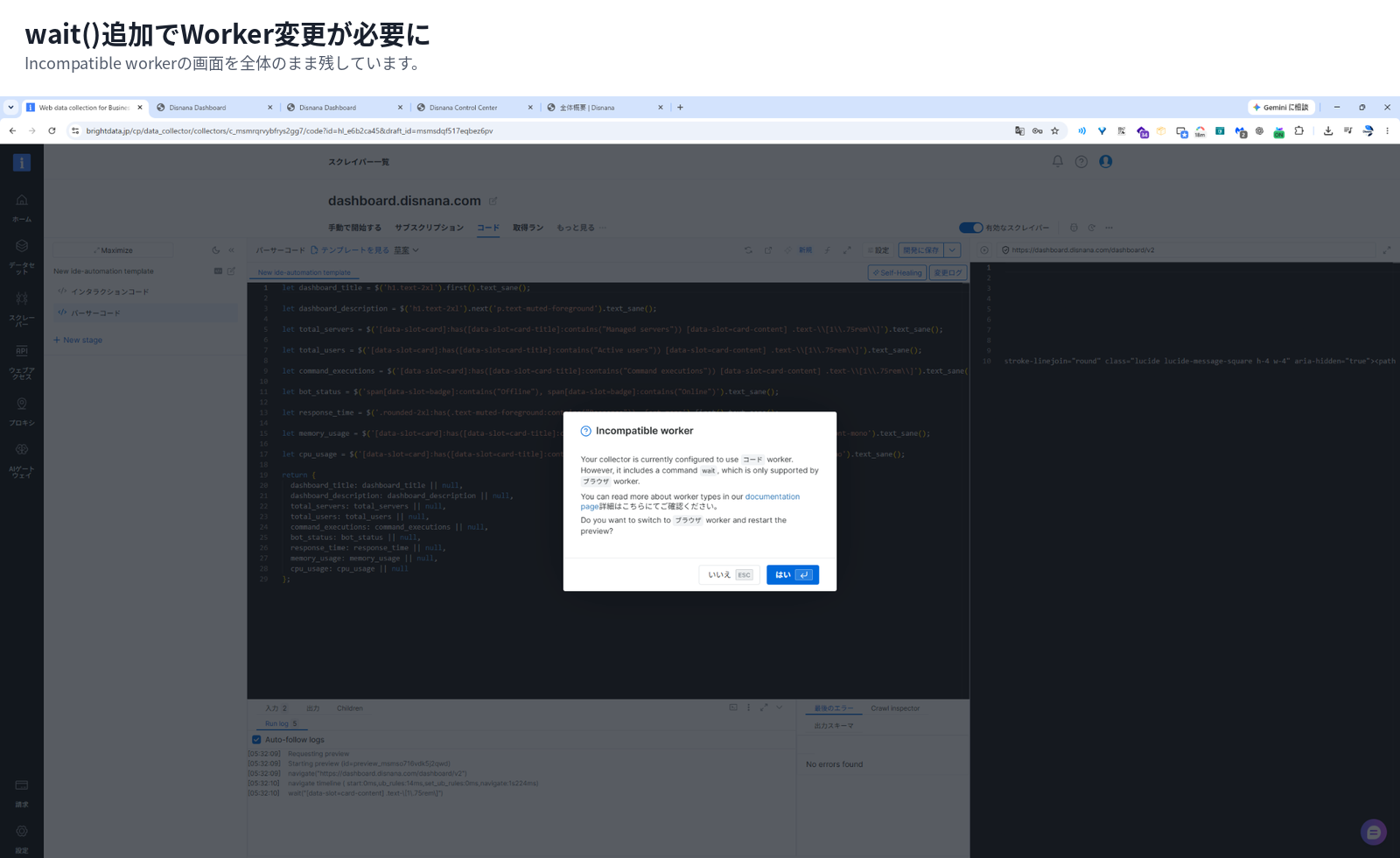
The original scraper was a Code worker, but the added wait() needs to run in a Browser worker.
Bright Data’s official docs explain that Code worker sends direct HTTP requests, while Browser worker uses a headless browser to handle JavaScript execution and DOM waiting.
You can check the worker differences in Scraper Studio worker types, and the function specs in Scraper Studio functions reference.
注意
Even if Self-Healing fixes the code, you should check whether the execution mode itself has changed.
If it changes from Code worker to Browser worker like this time, the speed and cost characteristics also change.
You can review it with a GitHub-like diff before applying it
Once the fix is done, the code before and after are shown side by side.
Deletions are red, additions are green. If you’re used to viewing diffs in GitHub and similar tools, the UI is pretty easy to understand.
Personally, I liked this a lot.
Instead of pushing the code that Self-Healing produced straight into Production,
you can go through the steps:
Review diff → Accept / Decline → Draft → Preview → Production
Even after applying it to Production, you can go back to older versions from Versions.
Rather than “a feature that lets AI fix things on its own,” it felt closer to a feature that lets AI draft the fix and a human review the code.
You could also compare the retrieved results Before / After, not just the code
During testing, it wasn’t just the code that could be compared:
Sample previous result
and
Current result
were also shown side by side.
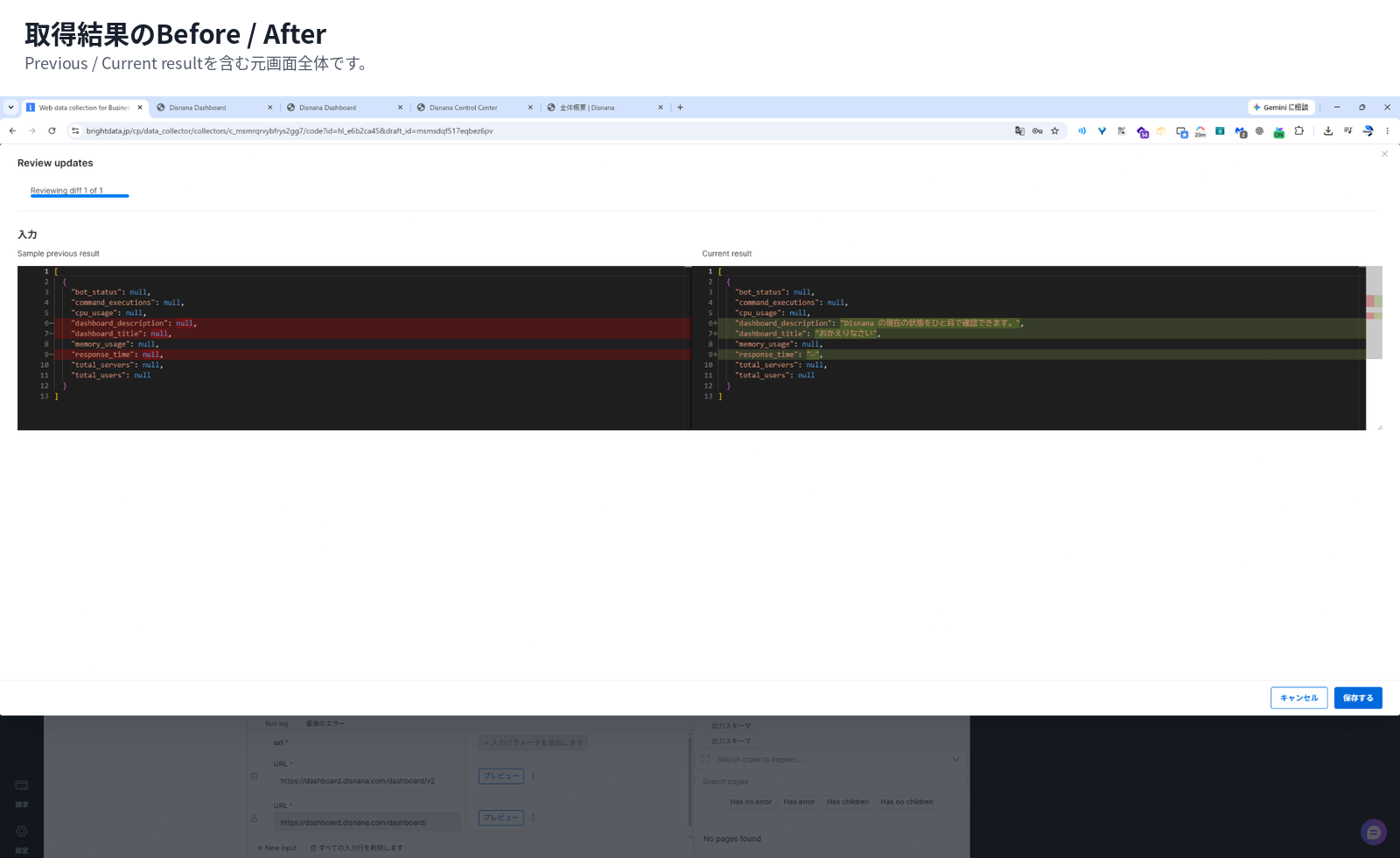
In v2, I was able to retrieve the dashboard title and description again, which are shown even when not logged in.
On the other hand, the real bot data and server count are designed to appear only after login, so they can’t be retrieved in a not-logged-in test.
That’s not a Self-Healing failure; those values simply don’t exist on the page in that state.
Could I make the old scraper follow the currently accessible information?
By that standard, I’d say Self-Healing for v2 was a success.
Being able to test immediately with past input is practical
After Accept, I could run a test crawl using the input I had used before.
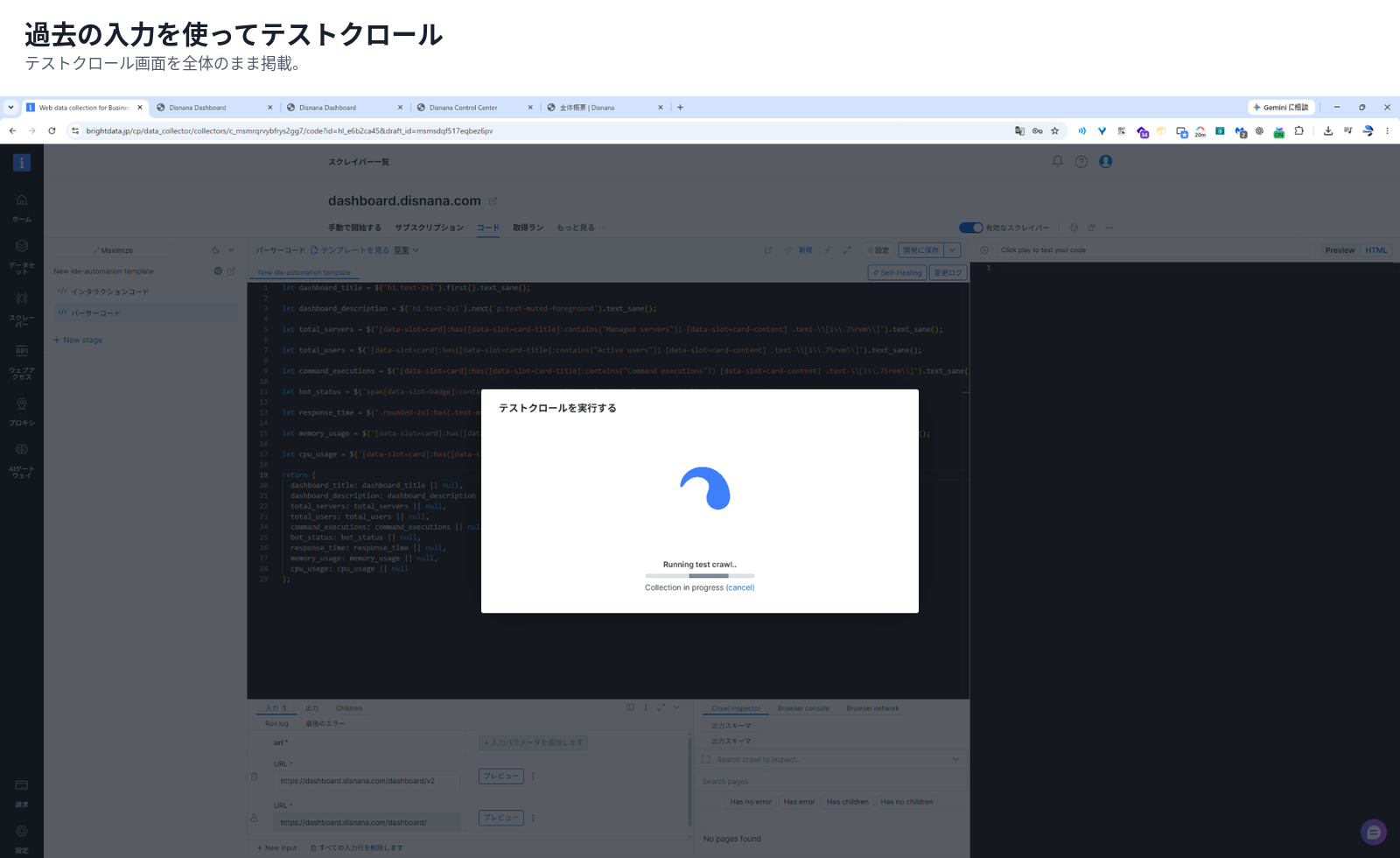
When dealing with site changes, what matters more than whether the code looks nice is:
Can I get the same necessary data back with the same input as before?
Because I could reuse conditions close to real data on the spot, the back-and-forth between fix and check felt pretty short.
You can check the Preview behavior in Scraper Studio IDE interface reference.
Even if it only takes a few minutes, not having to wait was huge
During Self-Healing, it says:
You can safely leave this page. We’ll email you when your code is ready.
And indeed, I got an email when it finished.
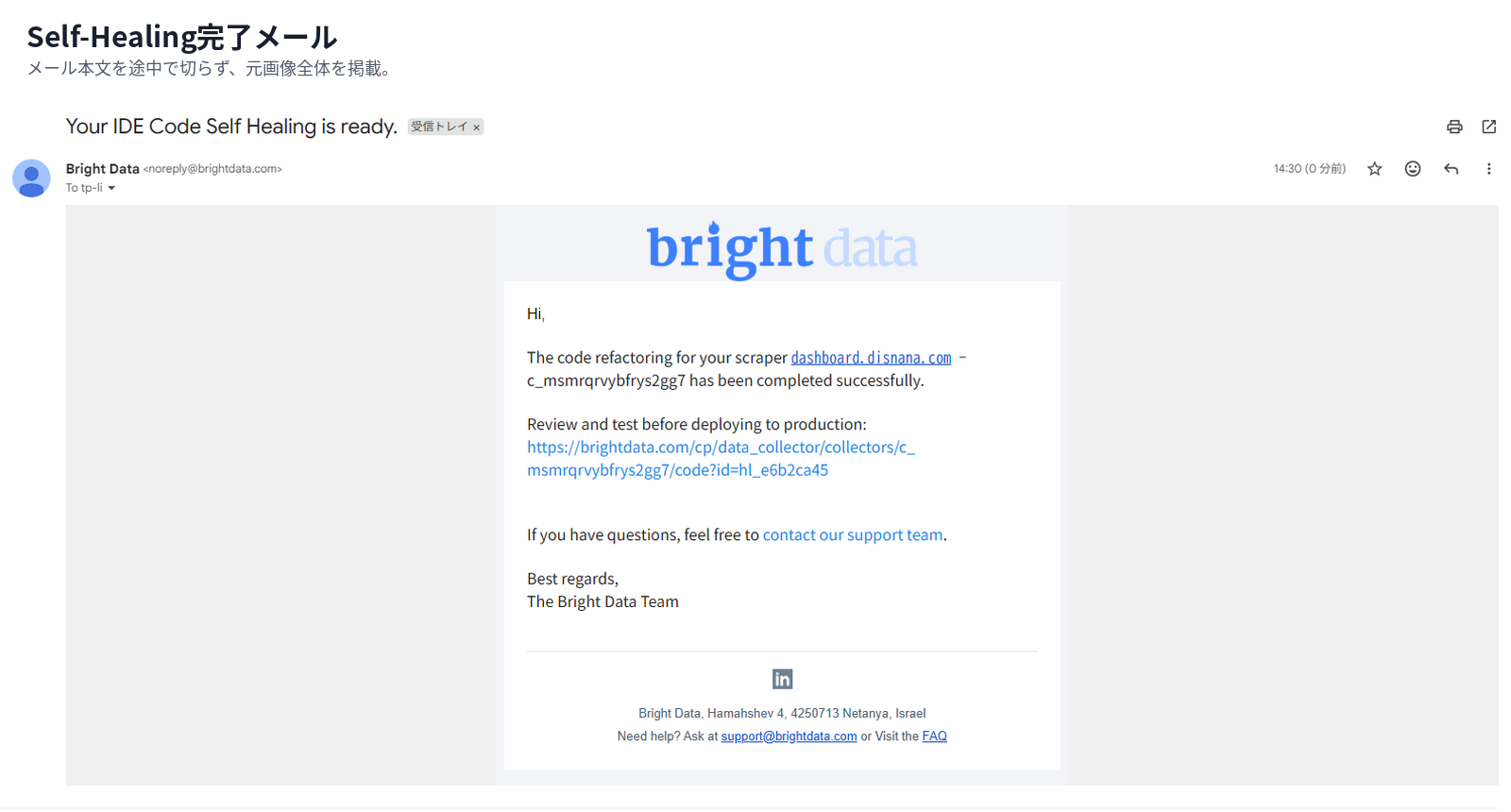
This process took only a few minutes.
If it’s just a few minutes, you might as well wait for it there.
But I started Self-Healing and then kept working on something else. When the email arrived, I came back and checked the diff.
No need to stop working just to stare at a progress bar.
Even if it’s only a few minutes, those minutes can be used for other work. When I actually used it, this kind of mundane detail was more appreciated than I expected.
Going back to the list was easy
If you press Back to scrapers list during processing, it literally takes you back to the My Scrapers list.
When returning, just select the target scraper and press Code at the top.
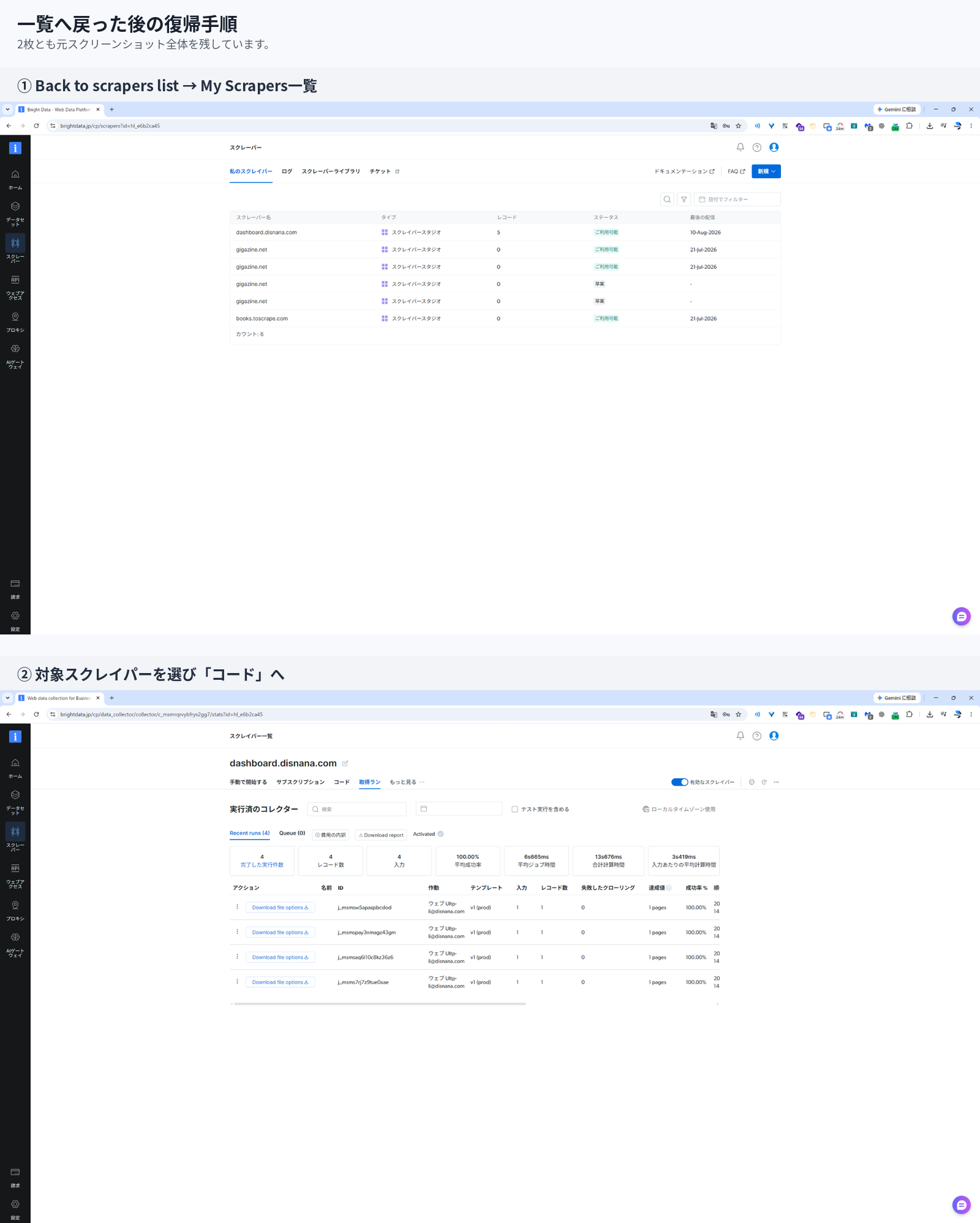
Even if you move to another screen while waiting, there was no confusion about how to get back to the original IDE.
So, can it fix v3, where even the page’s purpose changed?
This is the real limit test.
Up through v2, even though the DOM changed, you could still call it a new version of the same dashboard.
In v3, I redesigned the page as an overall overview.
The information structure the old scraper assumed —
- total server count
- total user count
- command execution count
- bot status
— changed fundamentally.
First, I ran the v2-ready scraper on v3 as-is.
[
  {
    "input": {
      "url": "https://dashboard.disnana.com/dashboard/v3"
    }
  }
]
Again, the expected fields did not come back.
This time I asked it not to force-fill values that don’t exist
For Self-Healing on v3, I added one more condition.
The site has been updated to v3, and the data can no longer be retrieved again.
Please adjust the scraper to match the current v3 page.
Please keep the existing output items and field names as much as possible.

However, since the screen layout and even the displayed information itself have changed in v3,
if information corresponding to existing fields does not exist on the page,
don’t force incorrect values into them.
For example, if you put the number of “managed” items into total_servers even though it means something different, the field would technically have a value, but the data would still be wrong.
注意
A wrong value is scarier than an empty one.
In scraping, it’s more important than “I got something” to preserve whether that field really has the same meaning.
In v3, it kept repeating Refactor and Validation
Self-Healing did start running on v3 too.
But compared to v2, it was clearly much longer, and it repeated fixes and checks like this:
Refactoring code...
Validating results after refactor...
Refactoring code...
Validating results after refactor...
Refactoring code...
And in the end, it did not get fixed.
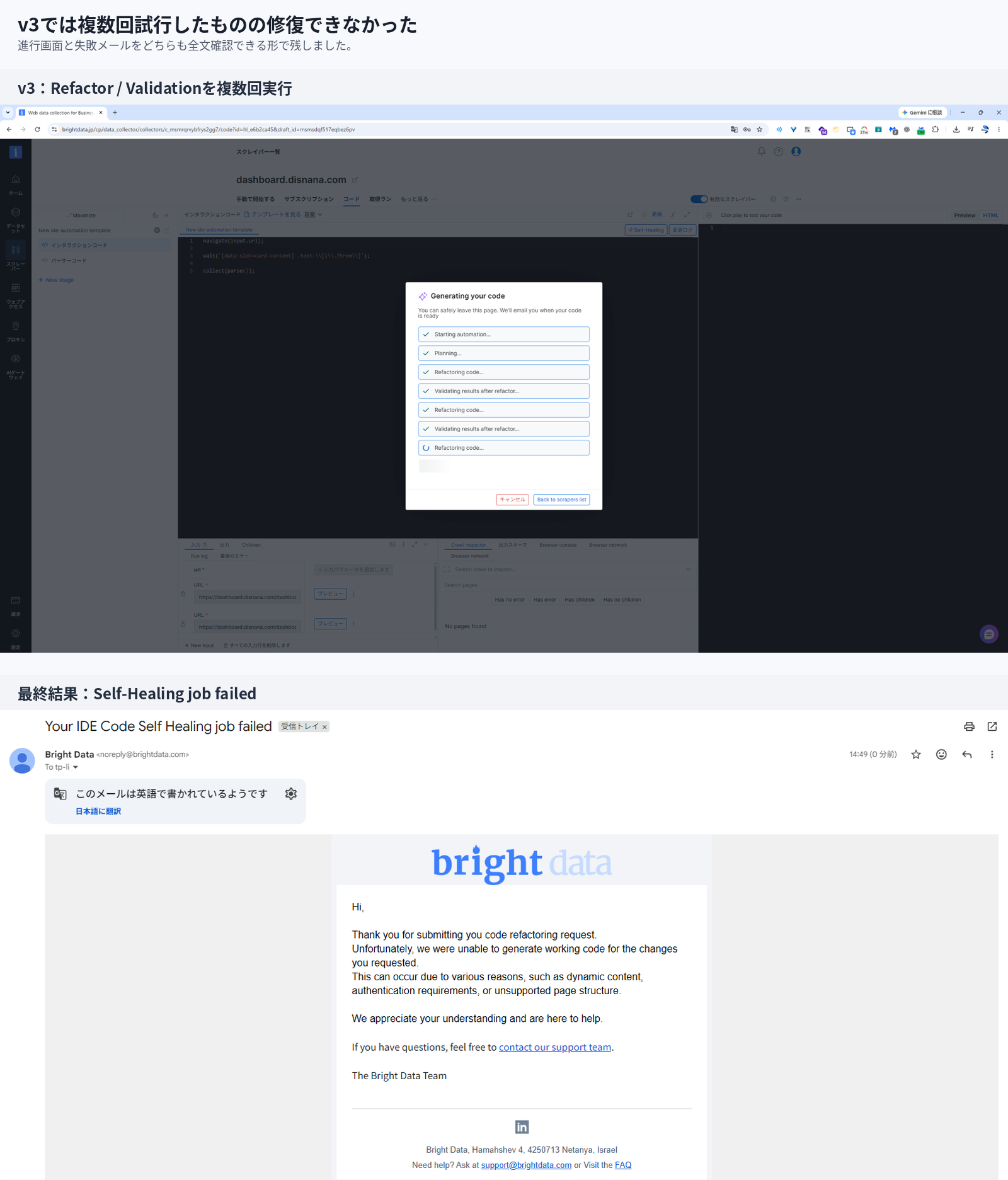
The email said it couldn’t generate working code for the requested changes.
I can’t identify the internal failure cause, so I won’t claim that the destructive v3 change was the direct reason.
Still, in this test, I could clearly see the difference that:
v2 could be recovered, while v3, where even the displayed information and page purpose changed, could not be repaired even after multiple Refactor / Validation cycles
If it can’t be fixed, rebuilding is sometimes the more natural choice
Personally, I don’t think the v3 failure was a bad result.
Once the page has changed this much, the question isn’t:
How do I keep the old scraper alive?
but rather:
Do I even need to keep extracting the same data with the old scraper?
The v1 scraper assumes a page design where you want things like server count, user count, and bot status.
In v3, the page’s role itself has changed.
If you keep trying to force the old 9 fields into that state, you end up stuffing meaningfully different data into the old schema.
A major renewal is also a good chance to revisit:
- Do we still need the same data?
- Do the field names still match their current meaning?
- What information do we really want from the new page?
- Do we even need to keep the scraper at all?
What this test showed about when to use it
| Site-side change | What happened this time | Operational judgment |
|---|---|---|
| selector / DOM change | Could follow in v2 | Try Self-Healing first |
| change in rendering timing | wait() was added | Check whether the worker needs changing too |
| URL migration | Updated to v2 URL | Review input differences too |
| major change in displayed information | Could not be repaired in v3 | Consider building a new one |
| page purpose changed | No longer matched the old schema | Revisit the requirements themselves |
情報
This is not a table that says “this change will always be fixed.”
It’s only a rough guide to operational judgment, based on what I actually tried across one site and three generations.
The best part was that it was not “fully automatic”
Before trying it, I imagined Self-Healing as a feature where AI fixes everything once it breaks.
After actually using it, what I liked was almost the opposite.
It leaves the final decision to a human.
If I summarize the flow this time:
When the worker needs to change, it asks for confirmation, and if it can’t be fixed, it reports failure. While it’s processing, you can move on to other work and come back when the email arrives.
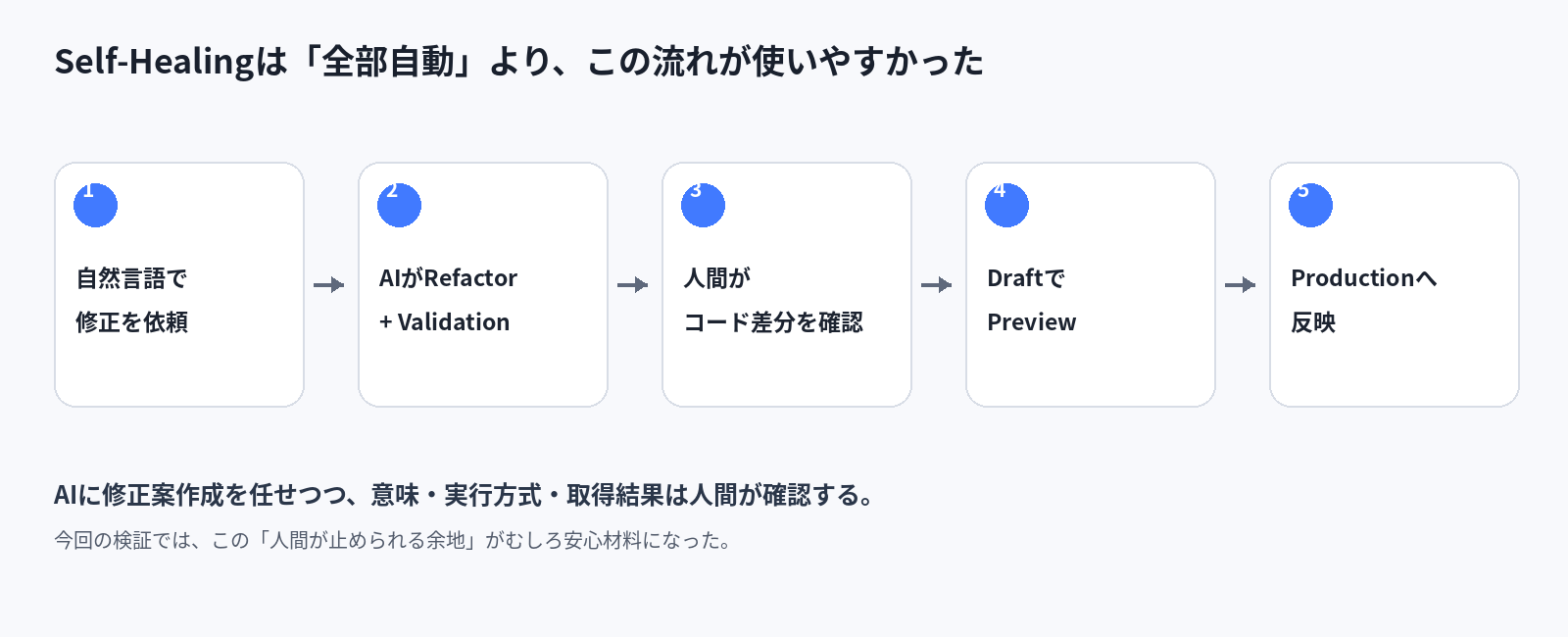
Rather than “fully automatic repair,” it felt like:
handing the annoying parts of scraper maintenance to AI, while the final review stays with a human
Conclusion: the value was not “preventing breaks,” but “shortening what happens after a break”
Even with Self-Healing, scrapers still break.
In this test too, the v1 scraper broke on v2, and the v2-fixed scraper could not be used on v3. Self-Healing also couldn’t repair v3.
Even so, for v2, I was able to go from a broken state to describing the situation in natural language, let AI handle the fix and validation, review the diff, check with real data, and then apply it to Production.
Normally, you’d open DevTools, hunt for the dead selector, trace the HTML, rewrite the code, and test again.
Self-Healing doesn’t make that work disappear.
It moves the initial investigation and fix-proposal part forward.
And if the page purpose changes too, don’t force it to live on — rebuild it with the new requirements.
After trying it, that felt like the most realistic way to use it.
About Bright Data Scraper Studio
The Self-Healing in Scraper Studio that I tested this time is a feature that generates fix proposals for scrapers broken by site changes, and helps restore them with diff review and Preview in the loop.
If you want to try Bright Data Scraper Studio, you can check out Bright Data here.
For the detailed Self-Healing specs, check the official documentation.
In this verification, it was able to keep up with v2-level changes, but it could not repair cases like v3 where the page purpose and displayed information themselves changed.
Personally, it felt best as a tool for deciding how far to fix with Self-Healing, and where to start over.
Also, Bright Data offers a Free tier (5,000 requests/month) that can be used free of charge up to 5,000 requests per month.