Automating B2B Sales: How to Automatically Generate High-Accuracy Lead Lists and Personalized Pitches to Increase Opportunities with Dify × Bright Data SERP API
By integrating the LLM app development platform Dify with Bright Data’s SERP API, this article builds a workflow that automatically extracts the companies you should be approaching right now from target keywords and auto-generates sales emails.
Note
This article was created in partnership with Bright Data. The links in the article include affiliate links.
“I spent three hours a day making lists, and the reply rate was still under 1%“—if you’re in charge of B2B new business development, you’ve probably felt this kind of futility at least once.
The real problem is not effort, but the quality of the approach. Sending one-size-fits-all emails without deeply understanding the other company creates a bad impression of your brand and leads to missed opportunities.
This time, I connected the LLM app development platform “Dify” with the SERP API of “Bright Data”, one of the world’s largest data collection infrastructures, and built a workflow that automatically extracts the companies you should be approaching right now from target keywords, then instantly generates sales emails that dig into each company’s unique challenges.
The template I created is published on Dify Marketplace.
The link is listed near the end of the article.
1. The challenge of “target extraction” in companies, and the benefits of introducing this tool
According to a HubSpot study, sales reps spend only 34% of their total working time on actual “deals and proposals.” The remaining 66% goes into “preparation work” like list building, research, and writing emails.
Inside sales teams in companies are currently facing the following issues:
- Outdated lists and competition overlap: Lists bought from vendors are often stale, and because everyone is sending similar template emails to the same companies, reply rates drop dramatically. Industry average cold email reply rates are said to be only 1–5%, making the limits of one-size-fits-all outreach obvious.
- Exploding research workload: Looking up each target company’s business and thinking about “why they need our product” takes 15–30 minutes per company per rep. Just listing 10 companies can eat up half a day.
- Brand damage: Mass emails that miss the mark and show no understanding of the other company’s business model directly create a negative impression of your brand. Once you’re seen as a “spam company,” future outreach becomes permanently ineffective.
This workflow solves these three issues by combining “SERP (search engine results page) data” with an “LLM.”
Companies that appear near the top of Google search results are businesses that are active in that area and currently have influence there. By using Bright Data’s API to obtain these latest search results as structured data, and then having the LLM compare “your product’s strengths” with “the other company’s business,” you can scale high-quality personalized outreach with a clear “Why You” message at zero manual effort.
| Conventional method | This workflow |
|---|---|
| List building: 15–30 minutes per company | After entering a keyword, automatically extracts the top 10 companies in seconds |
| Uniform template emails | Automatically generates personalized emails based on analysis of each company’s business |
| Reusing old purchased lists | Fetches the latest Google search results every time it runs |
2. Overall workflow structure and how the automation works
The workflow built in Dify this time is designed so data flows seamlessly from input to output.
- User input: Enter the “search keyword” for the companies you want to find, along with your own “product name and sales pitch.”
- Code execution: Use Python to URL-encode the input values and generate parameters for Bright Data.
- HTTP request: Call the Bright Data SERP API and obtain Google search results (title, snippet, URL, etc.) in JSON.
- Template: Combine the search results with your product information to dynamically generate context for the LLM.
- LLM: Analyze the data and create a top prospect list and personalized outreach emails.
The Python parameter generation process used first is as follows.
import urllib.parse

def main(keyword: str, language: str) -> dict:
    encoded = urllib.parse.quote_plus(keyword)
    lang = language.strip().lower() if language.strip() else "en"

    # Simple regional parameter (gl) mapping
    gl_map = {"ja": "jp", "en": "us", "fr": "fr", "de": "de", "ko": "kr"}

    return {
        "encoded_keyword": encoded,
        "hl": lang,
        "gl": gl_map.get(lang, "us")
    }
About the number of search results fetched
Due to changes in Google’s specifications, bulk-fetch parameters such as num=100 for getting 100 results through APIs no longer work properly. This workflow is designed to fetch the top 10 results, which are the most sales-valuable and reliable.
3. Why use Bright Data SERP API instead of building your own scraper
If you try to scrape search results with an in-house implementation, you will inevitably run into the walls of “CAPTCHA” and “IP blocking.” If you’re building automation into a business process, having things stop here is fatal.
Bright Data is an enterprise-grade data collection infrastructure with more than 72 million IP nodes across over 150 countries and regions, and it is used in operations by more than 20,000 companies worldwide, including Fortune 500 companies. By routing through that proxy network, you can completely avoid blocks and build a stable, production-level data pipeline.
How to sign up for Bright Data’s free trial and apply the promo code
If you create an account through the dedicated link below, you’ll receive $20 in free credit that you can use to validate the API.
👉 Bright Data sign-up ($20 credit included)
How to apply the promo code from the dashboard after registering
- Go to Bright Data and create an account / log in
- Open “Billing & Payments” from the left navigation bar
- In the first “Overview” tab, you’ll find a “Apply promo code” section, so click there
- Enter the promo code
harupythonin the input field and click “Apply” - Confirm that the credit has been applied on the same overview page
Once the code has been applied, just create a SERP API Zone and get an API key, and you can run the workflow right away.
The clean data you retrieve is combined with your company information in Dify’s template node.
# User Intent & Context
Search Keyword: {{ keyword }}
Language: {{ hl }}

# Sender Information (Optional)
Company Name: {{ company_name }}
Product/Service Name: {{ product_name }}
Value Proposition & Selling Points: {{ selling_points }}

# Search Results Data
{{ output }}
Then, the following system prompt makes the LLM function like an “excellent inside sales rep.”
You are an expert B2B Sales Intelligence and Outreach AI.
Always respond entirely in the language specified by the user.

You will receive Google search results data based on the user's target keyword, along with the user's company and product information (if provided).

Your task is to analyze the search results, identify the best potential B2B leads, and write highly personalized cold outreach emails pitching the user's product.
This produces not just a summary of information, but a proposal-style email based on a hypothesis of the other company’s challenges.
4. Example output and B2B use cases
As a real example, I ran it with the keyword サポーターズ (assuming an engineering hiring / event support company) and the ultra-lightweight database I’m developing, “NanaSQLite.”
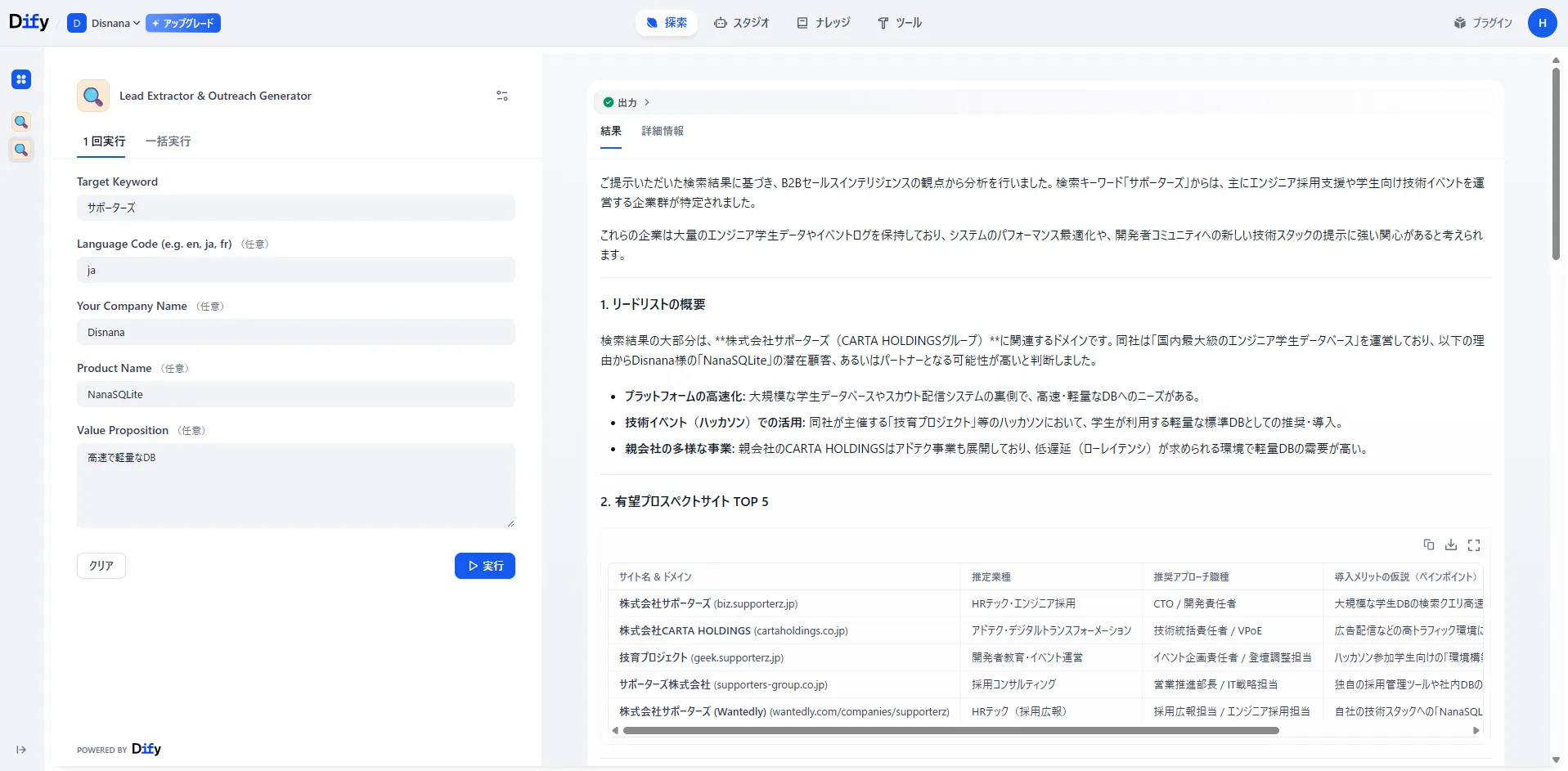
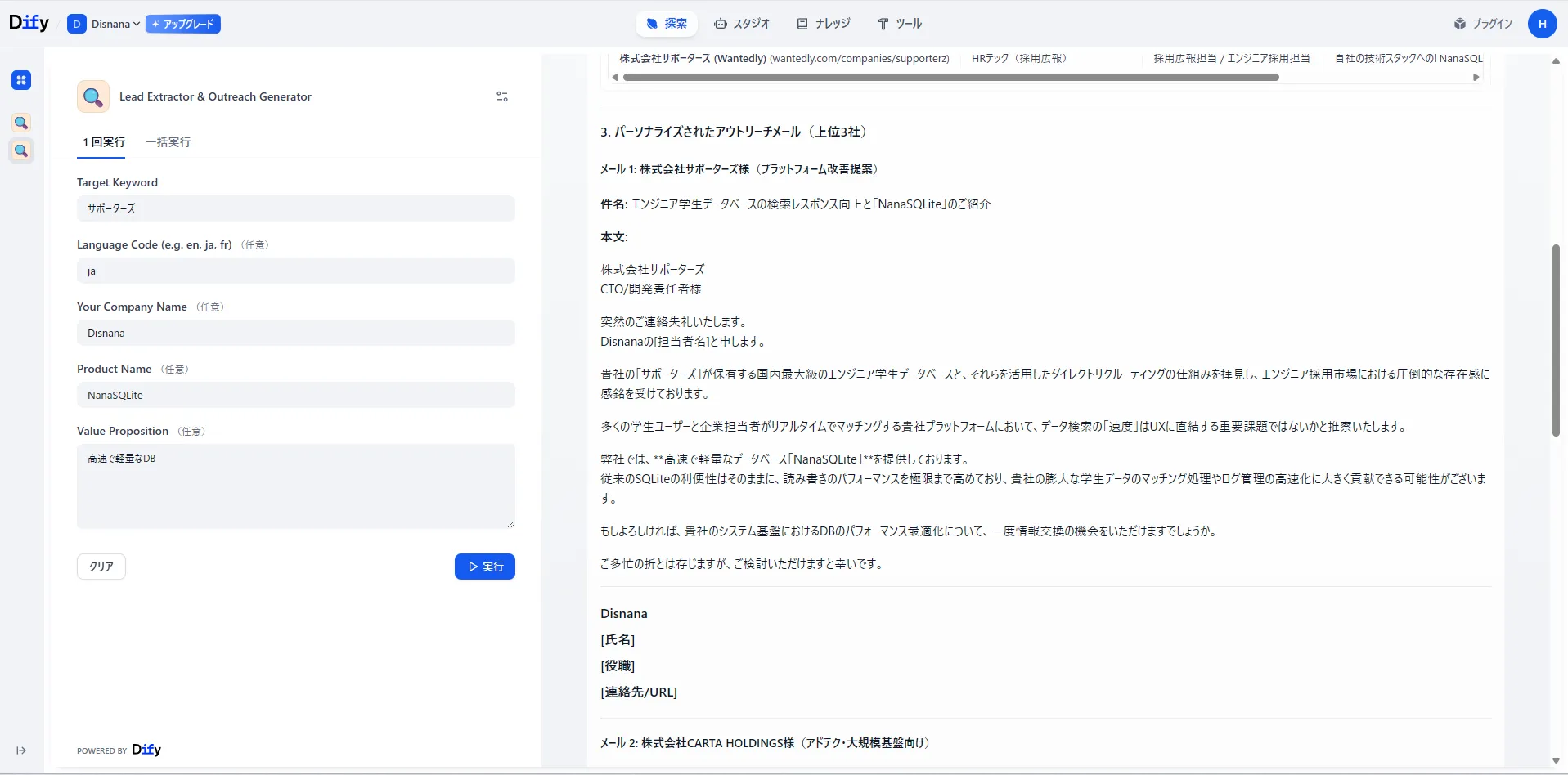
The LLM interpreted the company site information from the top search results and generated proposal text that goes deep into the actual business details of the company, such as “speeding up search on platforms that handle large volumes of student data” and “introducing a lightweight DB as infrastructure for hackathons.” It’s very different from a template email, and clearly communicates “why this company was contacted.”
This automation workflow works powerfully in the following scenarios:
- SaaS vendor sales strategy: Search with specific industry keywords and mass-produce high-quality outreach lists tied to the benefits of adopting your own service.
- IT consulting / custom development: Make pinpoint technical proposals to companies ranking highly for searches like “XXX industry DX” that seem to have technical bottlenecks.
- Marketing agencies: Extract companies that are actively advertising and present your operational expertise together with concrete improvement hypotheses.
By leaving the “work” of list creation to APIs and AI, sales reps can focus on the essential work of “strategy planning” and “customer conversations.” First, try using the free credit to see how personalized the proposals generated for your own product can be.
👉 Bright Data sign-up ($20 credit included)
👉 View the template on Dify Marketplace
Keep finding Disnana Blog on Google
When available for your account and region, add this site as a preferred source in Google so you can find new articles more easily.
Related Articles

A story of how Codex, after I handed it a Skill, went all the way to investigating the cause of the 402 error
A Qiita article collection CLI built with Bright Data’s Skill hit HTTP 402. This is how Codex investigated the cause, switched to the Browser API, and fetched 45 articles across two pages.

Is the web data you hand to AI actually getting captured properly? I tried letting AI handle scraper repairs too
I tested how AI handles missing scraping results and summarized the issues I found through fixes with Bright Data Scraper Studio, the CLI, and checking the target Collector.

Scrapers break whenever a site changes. How far can AI repair them?
I tested Bright Data Scraper Studio’s Self-Healing on real dashboard versions v1, v2, and v3, and recorded how far I could leave repairs to it, and when it was better to rebuild from scratch.